




What Is Iron Stops MT5 and How Does It Work?
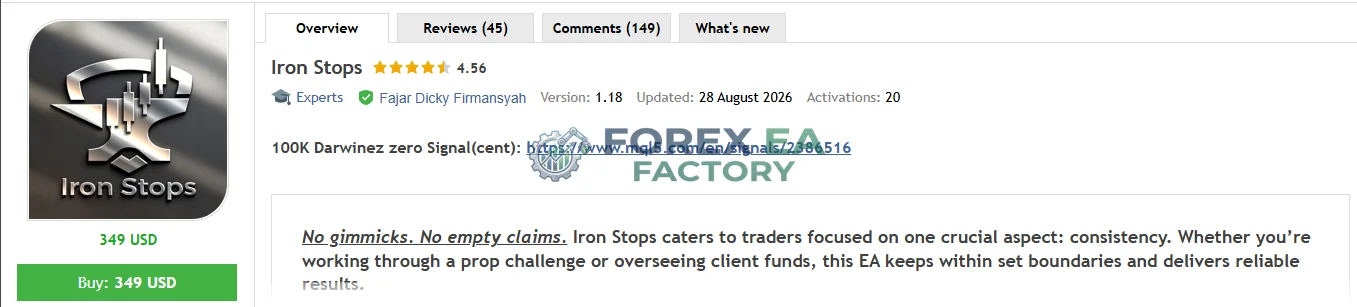
Iron Stops MT5 is an Expert Advisor developed by Fajar Dicky Firmansyah, available on the MQL5 Market. It is designed to automate trading on XAUUSD (Gold) using the M30 (30‑minute) timeframe. The EA’s primary selling point is its focus on consistency and disciplined risk management, rather than promising explosive returns. According to the vendor, it caters to traders working through prop challenges or managing client funds, where staying within defined boundaries is critical.
📌 Vendor Website: Available on the official product page | MQL5
Live Signal Performance on MQL5
📌 Iron Stops MT5 MQL5 Live Signal Verified | Check Live Result
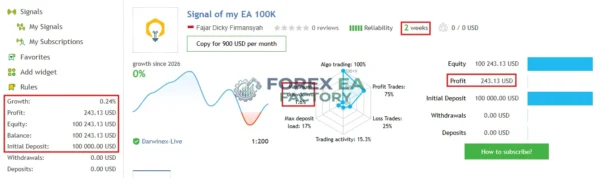
• Drawdown: 1.6%
• Profit: $243.13
• Deposit: $100,000
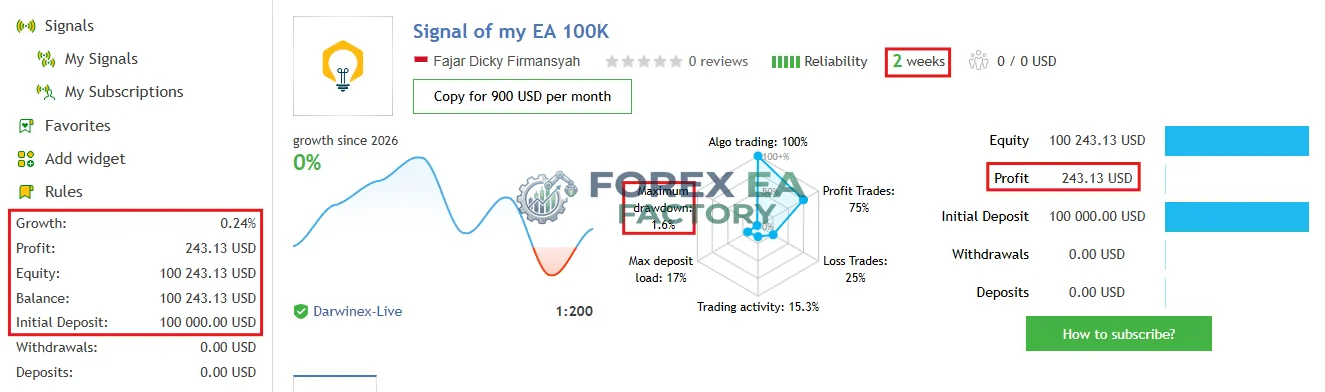
A real‑time signal named “Signal of my EA 100K” is publicly available on MQL5. As of the latest update, the signal shows:
These figures indicate a cautious, low‑frequency trading approach with a positive win ratio. The account has been active for two weeks at the time of writing, so the sample size is limited, but the transparency of a live trackable signal is a strong trust signal for prospective buyers.
Backtest Results – Vendor‑Provided Data
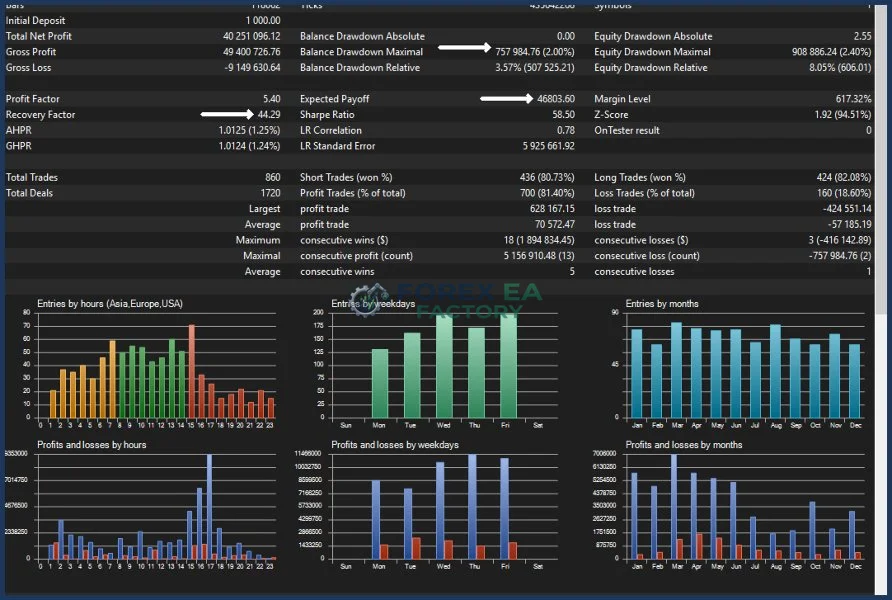
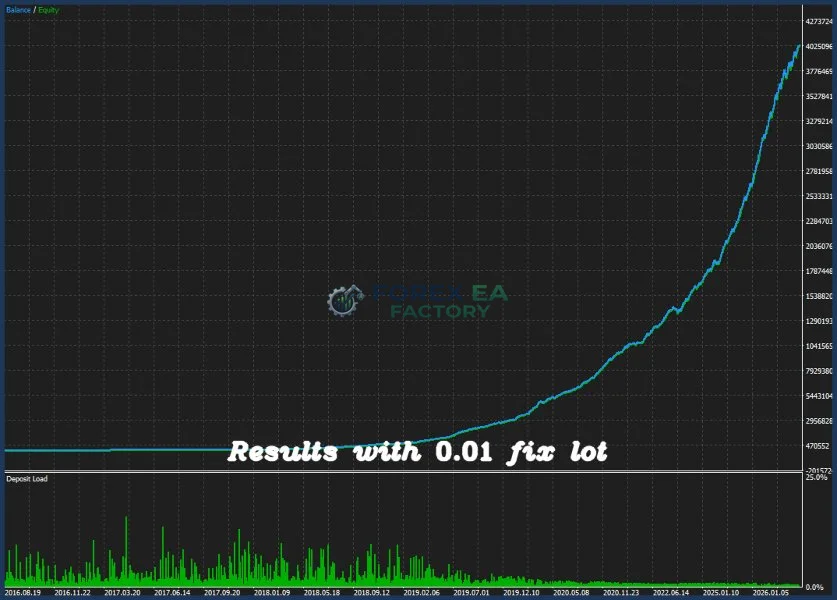
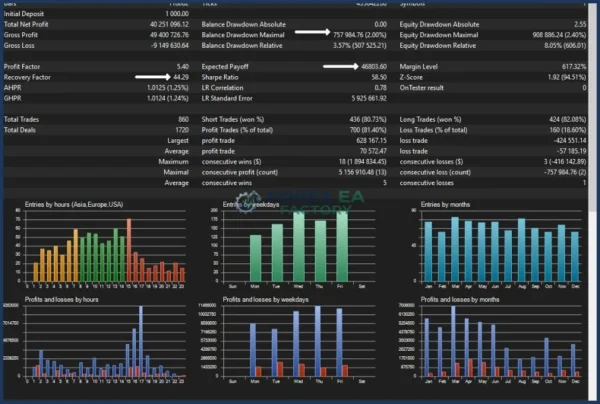
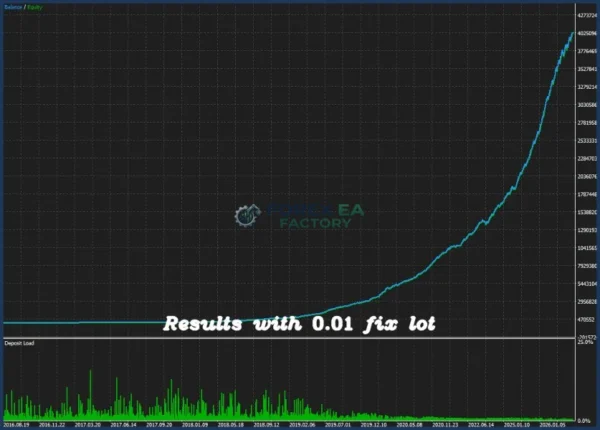
The vendor has published backtest results for Iron Stops MT5, covering a period from 2016 to 2026. While backtests are not guarantees of future performance, they provide insight into how the EA might behave under historical market conditions. Key metrics from the backtest summary include:
• Initial deposit: $1,000
• Total net profit: $40,251,096 (with 0.01 fixed lot?) – this is an extreme figure, likely using a very small lot size over many years; the actual profitability in real terms depends on lot scaling.
• Profit factor: 5.40
• Total trades: 860
• Profit trades: 81.40% (700 winners)
• Balance drawdown maximal: 2.00% (≈$757,985)
These results are impressive on paper, but they should be interpreted with caution. The test was run with a fixed 0.01 lot, which means the profit figures are scaled to the lot size; traders with larger accounts would need to adjust lot sizes accordingly. Additionally, backtests may not account for spread, slippage, and commission variations that occur in live trading. Always treat backtest results as a starting point, not a promise.
Key Features at a Glance
The EA comes with a set of built‑in features that aim to simplify automated gold trading while keeping risk in check. Below is a breakdown of the most noteworthy capabilities based on the vendor’s product page and supporting materials.
• Automatic risk calculation – position size is determined dynamically based on account balance and the stop‑loss distance, helping to maintain a consistent risk‑per‑trade ratio.
• Manual or fixed lot sizing – users can override automatic sizing and set a fixed lot size, offering flexibility for those who prefer a more hands‑on approach to position management.
• Drawdown protection – a configurable floating‑loss threshold stops the EA from opening new trades once losses exceed the selected limit, adding an extra layer of account‑level control.
• Single‑chart operation – the EA runs on a single XAUUSD M30 chart, keeping your MT5 workspace clean and reducing the complexity of multi‑chart setups.
• Automated position closure within 36 hours – positions are designed to close within a 36‑hour window, preventing indefinite exposure to market movements.
• Volume acceleration detection – the EA monitors volume changes to identify potential breakout signals, using this as part of its entry logic.
• Telegram support and configuration files – after purchase, buyers receive access to .ini configuration files and Telegram updates, facilitating setup and ongoing adjustments.
Risk Management – The Core of Iron Stops
The EA’s name, Iron Stops, reflects its emphasis on stop‑loss discipline and risk boundaries. The risk management features are designed to keep the EA within safe operational parameters:
• Automatic position sizing – adjusts lot size based on account equity and the distance to the stop‑loss, ensuring each trade risks a consistent percentage of the account.
• Drawdown protection – if floating losses exceed a user‑defined threshold, the EA stops opening new trades, preventing a losing streak from compounding.
• 36‑hour position closure – limits the duration of exposure, which can be particularly useful in gold’s often volatile overnight sessions.
These features do not eliminate risk entirely; they are risk‑mitigation tools. Gold markets can experience gaps and sharp moves that might bypass stop‑loss orders, and broker execution quality can affect the actual effectiveness of these protections.
Who Is Iron Stops MT5 Designed For?
This EA is not a one‑size‑fits‑all solution. Based on its specifications and available data, it is best suited for:
• Traders who focus exclusively on XAUUSD and are comfortable with the M30 timeframe.
• Users who have at least $1,000 in capital to meet the minimum deposit requirement.
• Intermediate to experienced traders who understand automated trading and are willing to test and optimise settings.
• Prop firm traders or fund managers who value consistency and drawdown control over aggressive growth.
• Traders who cannot watch charts continuously and prefer a rule‑based, low‑maintenance approach.
Conversely, the following traders might want to look elsewhere:
• Beginners who lack experience with gold’s volatility and automated systems.
• Traders expecting guaranteed profits or a completely hands‑off experience.
• Those whose brokers restrict automated trading on XAUUSD or have poor execution.
• Users who primarily trade other currency pairs or timeframes.
• Anyone with less than $1,000 in available capital, as the EA may not operate correctly with smaller accounts.
Pros and Cons
Pros
• Automates XAUUSD trading on MT5, reducing manual screen time.
• Built‑in risk management (automatic sizing, drawdown protection) helps maintain discipline.
• Live MQL5 signal provides transparent, real‑time performance tracking.
• Single‑chart setup simplifies installation and keeps the workspace clean.
• High win rate (81.4%) and profit factor (5.40) in backtests are encouraging.
• Vendor provides configuration files (.ini) and Telegram support for easier setup.
Cons
• Strategy logic is not fully disclosed – buyers must verify details with the vendor.
• Gold is inherently volatile; drawdowns can still occur despite protection features.
• Backtest results are based on fixed 0.01 lot and may not scale linearly to larger accounts.
• Requires a stable VPS and good broker execution to perform optimally.
• Minimum deposit of $1,000 may be a barrier for smaller traders.
• Limited track record (only 2 weeks of live signal data at the time of review).
Optimized Settings Table
| Setting | Recommended Value |
|---|---|
| Platform | MetaTrader 5 |
| Time Frames | M30 |
| Recommended Pairs | XAUUSD (Gold) |
| Minimum Deposit | $1,000 (vendor‑stated) |
| Recommended Deposit | $1,000+ (conservative starting point) |
| Leverage | Not specified – use broker’s standard, typically 1:100 or higher |
| Account Type | Any MT5 account supporting XAUUSD |
| Product Type | Expert Advisor (automated trading) |
| Recommended Broker | Broker with low spreads, fast execution, and no restrictions on gold trading (verify with vendor) |
How to Install Iron Stops MT5
1. Download the EA – purchase and download the Iron Stops MT5 .ex5 file from the official MQL5 Market.
2. Open MetaTrader 5 – launch your MT5 terminal and log in to your trading account.
3. Open an XAUUSD chart – create a new chart for XAUUSD and set the timeframe to M30.
4. Attach the EA – drag and drop the Iron Stops MT5 file onto the XAUUSD M30 chart, or use the Navigator panel to attach it.
5. Configure parameters – review the input settings (lot size, stop‑loss distance, drawdown threshold, etc.) and adjust them according to your risk preferences. It is recommended to start with the vendor’s supplied .ini file.
6. Enable automated trading – ensure the “AutoTrading” button is green, and confirm that the EA is allowed to trade.
7. Test on demo first – before going live, run the EA on a demo account for at least a few weeks to evaluate its behaviour under your broker’s conditions.
Risk Disclaimer
Trading Gold, Forex, and CFDs involves substantial financial risk and may result in the loss of some or all of your trading capital. Iron Stops MT5 does not guarantee profits, eliminate drawdowns, or remove market risk. Automated trading systems can experience losing trades, slippage, spread expansion, execution delays, liquidity problems, and periods of reduced performance. Past performance, whether from backtests or live signals, does not guarantee future results. Users should thoroughly test the EA on a demo account before using real funds, and adjust risk settings according to their individual financial situation and risk tolerance. Iron Stops MT5 is trading software and does not constitute financial, investment, or trading advice.
Final Verdict
Iron Stops MT5 presents a compelling option for traders seeking a dedicated XAUUSD automated solution with a strong emphasis on risk control. The availability of a live, publicly trackable signal and detailed backtest statistics adds a layer of transparency that many EAs lack. Its single‑chart design and straightforward configuration make it accessible, though the lack of full strategy disclosure means buyers should perform their own due diligence.
The EA is not a magic bullet; it suits disciplined, intermediate‑level traders who understand gold’s volatility and are comfortable with automated execution. If you match that profile and have at least $1,000 to deploy, Iron Stops MT5 is worth investigating further but always start with a demo, scrutinise the settings, and never risk capital you cannot afford to lose.
Iron Stops MT5 Free Download
Included 100% FREE for Forex EA Factory VIP Members





Reviews
There are no reviews yet.