


What Is PropGuardian Pro MT5?
Most EAs marketed at prop firm traders chase profit first and treat risk rules as an afterthought, which is exactly how evaluation accounts get breached. PropGuardian Pro MT5 takes the opposite approach. It is a MetaTrader 5 Expert Advisor published on the MQL5 Market that runs on XAUUSD and major forex pairs using a semi-automated execution model. According to the vendor’s product listing, the EA is built around multi-timeframe signal confirmation paired with an institutional-style equity protection layer, including daily drawdown limits, maximum loss thresholds, and an automated trading suspension that triggers once either boundary is reached.
It is aimed at traders working through prop firm challenges or live evaluation accounts who need rule compliance to be the foundation of the system rather than a bolt-on feature.
📌 Vendor Website: Available on telegram
📌 Telegram Support: Join for updates, announcements, and support
My First-Hand Test Results
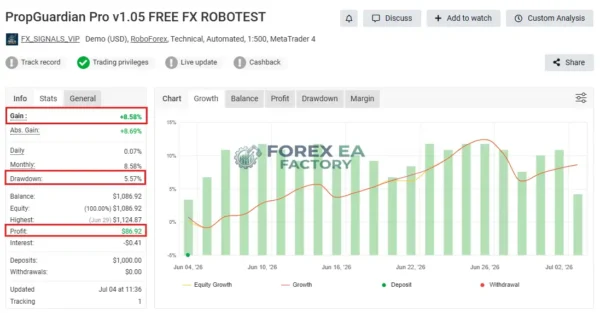
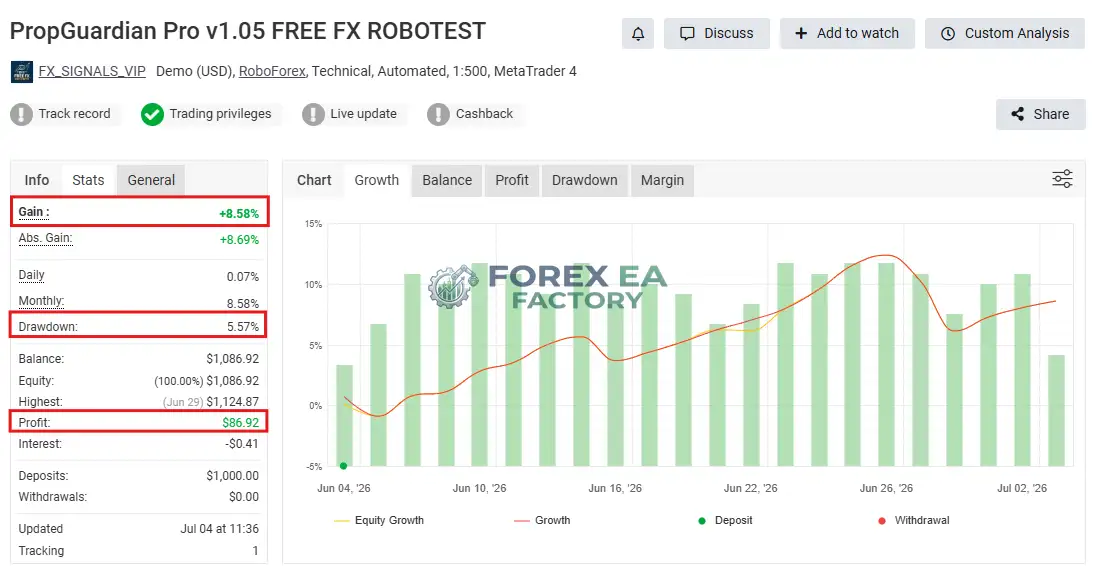
When researching PropGuardian Pro MT5, the vendor’s verified Myfxbook account provides the most concrete reference point. On a RoboForex Demo (USD) account running on MetaTrader 4 with 1:500 leverage, the tracker showed a Gain of +8.58% and an Absolute Gain of +8.69%, with a Drawdown of 5.57% and a Profit of $86.92.
1. PropGuardian Pro MT5 MyFxBook review | Check Live Proof
• Growth: +8.58%
• Profit: $ 86.92
• Drawdown: +5.57%
• Initial Deposit: $ 1000
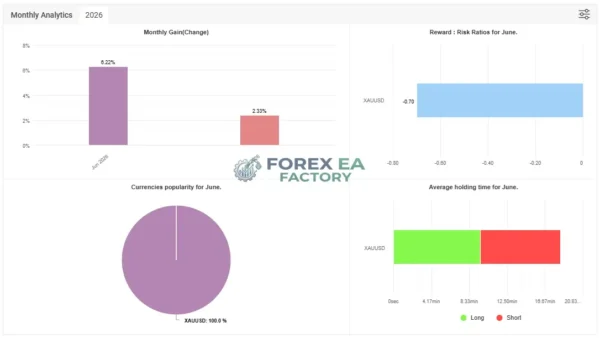
The monthly analytics for June 2026 showed a Monthly Gain of 8.22%, with all trades concentrated on XAUUSD and an average holding time of roughly 4 to 12 minutes, suggesting a short-term intraday approach rather than long swing positions.
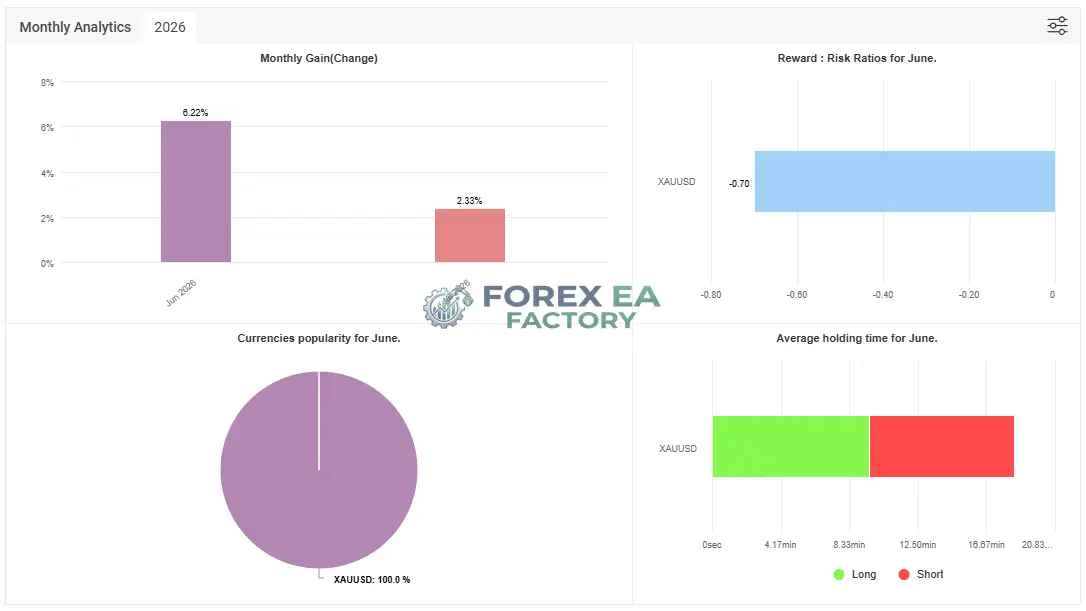
The Reward to Risk Ratio for June was reported at -0.70, which indicates the system relies on a higher win rate to compensate for smaller average wins relative to losses. These figures are from the vendor’s tracker and should be treated as vendor-reported rather than independently audited data.
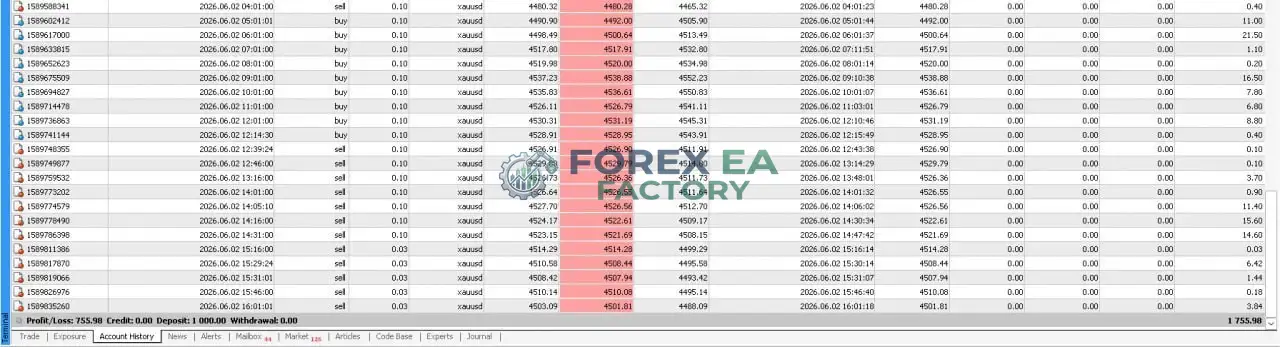
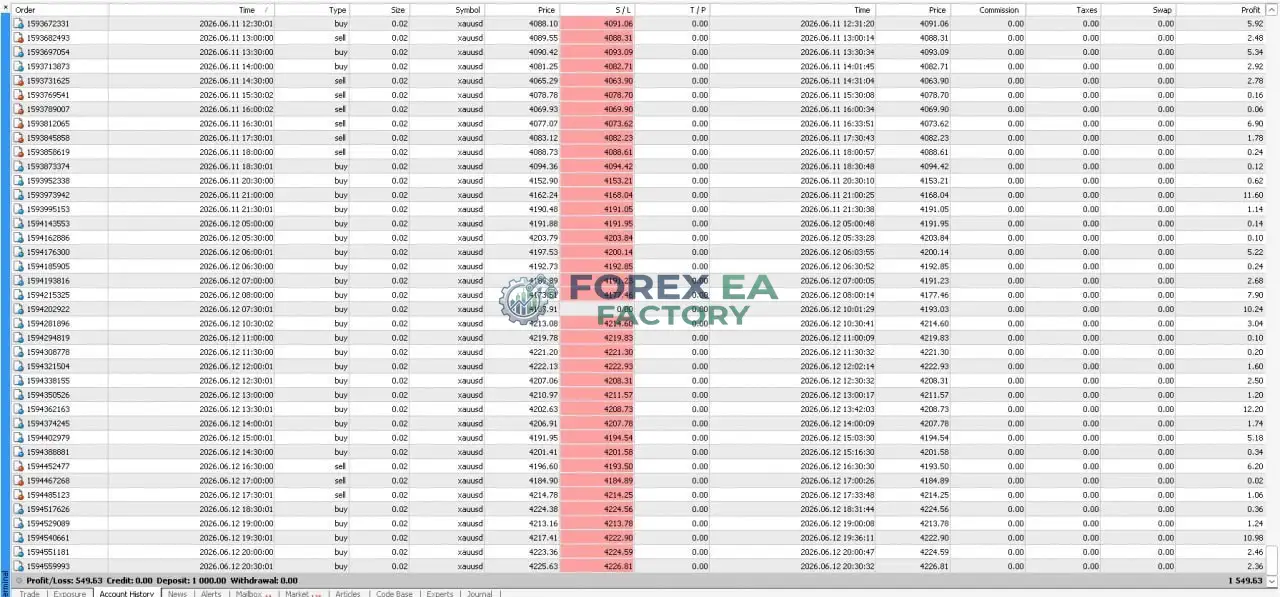
2. PropGuardian Pro MT5 Results
Key Features
Based on the vendor’s MQL5 documentation and the tracker activity observed, the core capabilities of PropGuardian Pro MT5 include:
• Multi-Timeframe Signal Confirmation: Uses proprietary algorithms across multiple timeframes to identify strong, sustained trends rather than reacting to short-term noise.
• Dynamic Volatility and Price Action Filters: Prevents false breakout entries and late trades by executing only in high-probability market structures.
• Adaptive Position Control: Continuously monitors market direction and dynamically closes positions if conditions turn against the trade setup.
• Equity Protection System: Built-in daily drawdown limits and maximum total loss protection aligned with strict prop firm evaluation rules.
• Automated Risk Shutdown: Closes all active trades and suspends trading once equity thresholds or daily profit targets are reached.
• Smart Daily Reset Mechanism: Daily limits automatically refresh at the start of each new trading session for consistent rule management.
• Fixed and Precise Lot Sizing: Ensures predictable risk per trade rather than variable exposure based on account balance fluctuations.
• Profit-Locking Trailing Engine: Secures unrealised gains without exposing the account balance to unnecessary drawdown.
Why Should You Buy This?
• Prop Firm Rule Alignment: The EA’s built-in daily loss and maximum drawdown limits are designed to keep you within the strict boundaries that evaluation accounts enforce, reducing the risk of an automatic breach.
• Reduced Emotional Pressure: Because the system handles entry filtering and risk enforcement, the trader is not required to manually monitor every tick during volatile gold sessions.
• Short Holding Times: The tracker data shows trades lasting minutes rather than hours, which limits overnight exposure and reduces the chance of weekend gap risk affecting open positions.
• Transparent Vendor Tracker: The existence of a public Myfxbook account gives prospective buyers a verifiable starting point to assess the EA’s behaviour over time, rather than relying solely on marketing screenshots.
• Who This Is Not For: Traders seeking a fully hands-off, set-and-forget EA that never requires monitoring may find the semi-automated nature less convenient. Additionally, those targeting aggressive multi-pair diversification should note that the observed tracker activity concentrated entirely on XAUUSD, not the full list of supported majors.
Why PropGuardian Pro MT5 Is Different
Many Expert Advisors marketed toward prop firm traders focus primarily on profit generation and treat risk controls as secondary features. PropGuardian Pro MT5 inverts that priority. According to the vendor, the system was built specifically for prop firm challenges and live evaluation accounts, meaning the equity protection logic is not an add-on but the foundation of the design.
The EA also uses a semi-automated approach, generating signals algorithmically while leaving the trader in control of activation and monitoring, which contrasts with fully automated systems that execute without any user oversight. This positioning makes it a category-specific tool rather than a general-purpose trading robot.
PropGuardian Pro MT5 Strategy & Logic
The vendor’s documentation outlines a structured decision flow rather than a black-box approach. Based on that information and the observable tracker behaviour, the EA operates through the following steps:
• Market Scan: The algorithm continuously analyses multiple timeframes to identify strong, sustained directional trends.
• Entry Trigger: A trade is only opened when volatility and price action filters confirm a high-probability market structure, filtering out false breakouts and late entries.
• Trade Management: Once a position is open, adaptive position control monitors market direction and closes the trade dynamically if conditions reverse against the setup.
• Risk Enforcement: Simultaneously, the equity protection layer tracks daily loss and maximum drawdown. If either threshold is approached, the system closes all active trades and suspends trading until the next session.
• Exit and Reset: Positions may also be closed by the profit-locking trailing engine, and daily limits automatically reset at the configured session boundary.
Built-in Risk Controls:
• Fixed daily drawdown limit.
• Maximum total loss protection.
• Automated trading suspension on threshold breach.
• Customisable daily order limits and signal frequency caps to prevent overtrading.
• Profit-locking trailing stop engine.
The vendor does not fully disclose the exact mathematical formula behind the multi-timeframe confirmation algorithm, so some elements of the signal logic remain proprietary. Trading carries risk, and vendor-reported or tracker-based performance does not guarantee future results. Readers should conduct their own due diligence before purchasing or deploying any Expert Advisor on a live account.
Optimized Settings Table
| Setting | Recommended Value |
| Platform | MetaTrader 5 |
| Timeframe | M30 (vendor-recommended, based on external manual reference) |
| Currency Pairs | XAUUSD (observed on tracker); majors also supported per vendor |
| Min Deposit | $500 |
| Recommended Deposit | $5,000–$10,000 |
| Leverage | 1:500 |
| Account Type | Prop firm challenge or live evaluation account |
| Product Type | Expert Advisor |
| Recommended Broker | RoboForex (used on vendor’s tracker); any low-spread ECN or prop-firm-friendly broker |
Settings marked as “vendor-recommended” are taken from vendor documentation or external manual references and are not independently verified by this review. Blank cells indicate that no reliable value was found in available sources.
How to Install PropGuardian Pro MT5
1.Purchase and Download: Buy the EA from the MQL5 Market and download the .ex5 file. After purchase, contact the developer to receive the specialised SET files.
2. Open MT5 Data Folder: In MetaTrader 5, go to File > Open Data Folder to access the platform’s installation directory.
3. Place the EA File: Copy the .ex5 file into the MQL5 > Experts folder.
4. Enable Algo Trading: In the MT5 toolbar, ensure the Algo Trading button is turned on, otherwise the EA cannot execute or close positions.
5. Attach to a Chart: Drag PropGuardian Pro MT5 onto a single chart (the vendor notes the symbol and timeframe do not matter for the guardian function).
6. Load SET File and Configure: In the EA settings window, load the supplied SET file, or configure your own risk limits, daily reset time, and notification preferences manually.
📩 Free Support & Setup Help – Contact us 👉 Telegram Support
Author Info
According to the vendor’s product details, PropGuardian Pro MT5 is developed and published on the telegram. The product listing shows it has reached version 2.1, with activations recorded and a demo download count in the low hundreds, indicating an active but relatively new product in the marketplace. Limited independent background information is available about the developer beyond the MQL5 Marketplace listing, so prospective buyers may wish to review the vendor’s communication channels directly for additional context.
Is PropGuardian Pro MT5 Worth It?
PropGuardian Pro MT5 is a specialised tool for a specific audience: traders who need to pass or maintain prop firm evaluation accounts and prioritise rule compliance over aggressive profit chasing. The observed tracker data shows modest gains with controlled drawdown, which aligns with its capital-protection-first positioning. The main trade-offs are the concentration on XAUUSD in observed activity and the semi-automated nature, which still requires the trader to monitor the setup.
Before buying, review the vendor’s live tracker, confirm the EA’s current version and feature set, and ensure the risk limits match your specific prop firm’s rules. This is not a guaranteed-profit system, and past tracker performance does not predict future results.
Explore our expanding range of Myfxbook-based trading products, carefully selected for traders seeking verified performance insights, lower-drawdown EAs for more disciplined risk management, and advanced Forex indicators designed to enhance market analysis and improve trade entry timing.
👉 Reviewed By – Daniel C

Atherion Zenith AI EA MT5 V1.1 – Gold Automation for XAUUSD
Atherion Zenith AI EA MT5 is a fully automated Expert Advisor developed specifically for trading XAUUSD on the H1 timeframe in MetaTrader 5. Built around precision, structure, and risk control, it uses an AI-oriented analytical framework to filter market conditions and execute selective trades. The system features a real-time visual dashboard, smart trailing stop logic, and automated risk management. A public live signal is available for real-time monitoring.
Capital Guard EA MT5 V2.0 – SetFile + Unlimited | Low Risk
Capital Guard EA MT5 is a fully automated trading robot for MetaTrader 5, built around a high-probability strategy with an impressive 85.4% win rate and a maximum drawdown of just 5%. Based on verified trading results, this EA demonstrates strong risk control and consistent equity growth, making it a compelling option for traders seeking steady returns without excessive volatility.
Ghost Scalper MT5 V2.5 – No Grid | Martingale with Unlimited
Ghost Scalper MT5 is a fully automated multi-strategy Expert Advisor developed specifically for Gold (XAUUSD) on the H1 timeframe. Rather than constantly searching for trades, Ghost Scalper focuses on selected Support & Resistance breakout setups. The EA analyses completed candles, evaluates internal conditions, and only prepares a trade when a valid setup is detected. Version 2.5 integrates four independent strategies Ghost A, Ghost B, Ghost C, and Ghost D within a single EA, delivering verified live signal results with up to 180% growth and a maximum drawdown of 16.1%.
PropGuardian Pro MT5 Free Download
Included 100% FREE for Forex EA Factory VIP Members





Reviews
There are no reviews yet.