


Ghost Scalper MT5 Settings Review: Introduction
This review examines the supplied SET file for Ghost Scalper MT5 v5.20, a multi-strategy Gold (XAUUSD) Expert Advisor designed for the H1 timeframe on the MetaTrader 5 platform. The focus is strictly on the configuration itself: the visible input parameters, the per-strategy money-management structure, the implications of running four independent strategies simultaneously, and the backtest and live evidence provided alongside the SET file.
The available SET file is intentionally compact. It exposes the core strategy selection, per-strategy lot or risk controls, and system identifiers. It does not expose the internal entry logic, trailing mechanics, or advanced protection features that the EA manages internally. This review therefore explains what the supplied settings actually control, what they leave to the EA’s internal engine, and how the configuration should be assessed on its own terms. For the broader product overview, strategy description, and live signal links, the full Ghost Scalper MT5 product overview remains the appropriate reference.
➡️ Telegram Support: Join for updates, announcements, and support
Recommended SET File Overview
The configuration is presented as an MT5 input for Ghost Scalper MT5 on an XAUUSD.m chart. The SET file does not carry a separate label, risk profile name, or stated optimization purpose in the visible material. It is therefore treated throughout this review as the supplied recommended configuration, not as an independently verified or vendor-certified optimization.
The visible structure divides into five logical groups:
• ENTRY MODE – selects which Ghost strategies are active.
• GHOST A, B, C, and D MONEY MANAGEMENT – independent lot or risk controls for each strategy.
• SYSTEM – magic numbers for each strategy and the dashboard mode.
The backtest report supplied alongside the SET file identifies the testing environment as JustMarkets-Demo2 (Build 6230), with XAUUSD.m on the H1 timeframe, an initial deposit of 1,000.00 USD, and a leverage setting of 1:500. The testing period spans 2026.01.01 to 2026.10.18 and uses 99% real ticks.
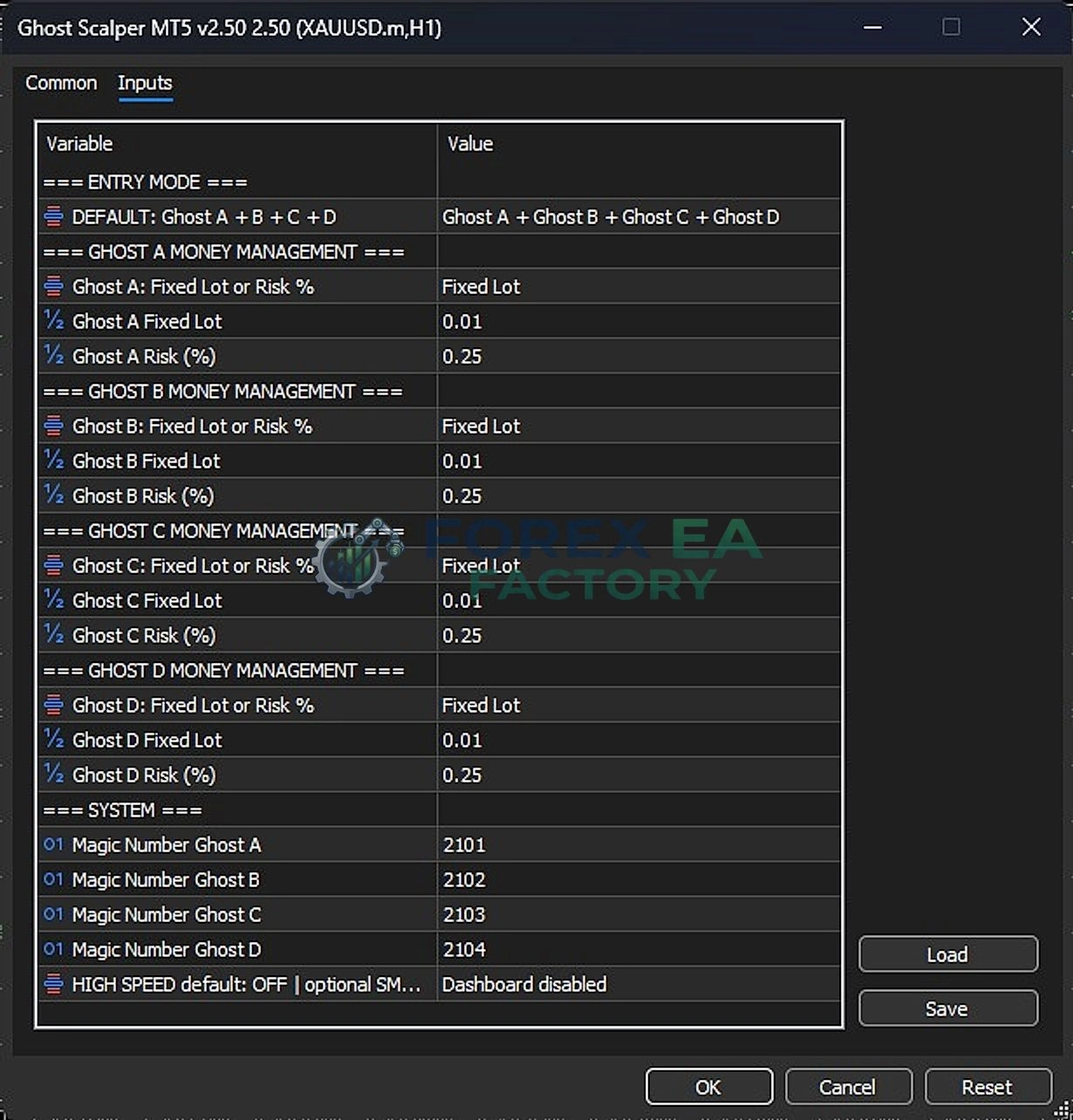
Complete Ghost Scalper MT5 settings Input Parameters Explained
The following table reproduces every parameter visible in the supplied settings image. The “Supplied Value” column reflects the exact value shown. The interpretation column distinguishes between functions that are explicitly documented by the vendor, functions that are reasonably implied by the parameter name, and functions that cannot be fully confirmed from the available materials.
| Input Parameter | Supplied Value | What It Controls | Practical Effect and Important Notes |
|---|---|---|---|
| ENTRY MODE | |||
| DEFAULT: Ghost A + B + C + D | Ghost A + Ghost B + Ghost C + Ghost D | Selects which of the four independent Ghost strategies are enabled. | All four strategies are active. Each strategy has its own entry logic, pending-order behaviour, and trade management. Running all four increases the number of potential simultaneous setups and therefore the combined exposure. The vendor documentation describes the four strategies as independent breakout and momentum modules that can be enabled or disabled individually. |
| GHOST A MONEY MANAGEMENT | |||
| Ghost A: Fixed Lot or Risk % | Fixed Lot | Selects the position-sizing method for Ghost A. | In Fixed Lot mode, Ghost A uses the fixed lot value shown below. The alternative is a risk-percentage mode, where lot size is calculated from a percentage of account equity. The supplied configuration keeps Ghost A on fixed lot. |
| Ghost A Fixed Lot | 0.01 | The fixed lot size used by Ghost A when Fixed Lot mode is selected. | 0.01 lots per Ghost A entry. Because each strategy can open multiple positions or pending orders, the effective exposure is not limited to a single 0.01 lot. The vendor’s quick-start guidance also references 0.01 as the default starting lot for a 1,000 USD account. |
| Ghost A Risk (%) | 0.25 | The risk percentage used by Ghost A when Risk % mode is selected. | This value is inactive in the supplied configuration because Ghost A is set to Fixed Lot. If the mode were changed to risk-based sizing, 0.25% would be the equity risked per trade. The parameter remains visible as a configurable fallback. |
| GHOST B MONEY MANAGEMENT | |||
| Ghost B: Fixed Lot or Risk % | Fixed Lot | Selects the position-sizing method for Ghost B. | Ghost B is configured identically to Ghost A: fixed lot sizing, independent of Ghost A. |
| Ghost B Fixed Lot | 0.01 | The fixed lot size used by Ghost B when Fixed Lot mode is selected. | 0.01 lots per Ghost B entry. Combined with Ghost A at the same fixed lot, the two strategies can double the base lot exposure if they trigger simultaneously. |
| Ghost B Risk (%) | 0.25 | The risk percentage available for Ghost B if risk-based sizing is enabled. | Inactive under the supplied Fixed Lot configuration. If activated, Ghost B would risk 0.25% of equity per trade, independently of Ghost A’s risk setting. |
| GHOST C MONEY MANAGEMENT | |||
| Ghost C: Fixed Lot or Risk % | Fixed Lot | Selects the position-sizing method for Ghost C. | Ghost C is also configured on fixed lot sizing. The supplied SET file does not differentiate the money-management mode across the four strategies. |
| Ghost C Fixed Lot | 0.01 | The fixed lot size used by Ghost C when Fixed Lot mode is selected. | 0.01 lots per Ghost C entry. The same base exposure applies as Ghost A and B. |
| Ghost C Risk (%) | 0.25 | The risk percentage available for Ghost C if risk-based sizing is enabled. | Inactive under the supplied configuration. |
| GHOST D MONEY MANAGEMENT | |||
| Ghost D: Fixed Lot or Risk % | Fixed Lot | Selects the position-sizing method for Ghost D. | Ghost D follows the same fixed-lot structure as the other three strategies. |
| Ghost D Fixed Lot | 0.01 | The fixed lot size used by Ghost D when Fixed Lot mode is selected. | 0.01 lots per Ghost D entry. With all four strategies active and all four on 0.01 fixed lot, the configuration establishes a uniform 0.01-lot baseline for every strategy. |
| Ghost D Risk (%) | 0.25 | The risk percentage available for Ghost D if risk-based sizing is enabled. | Inactive under the supplied configuration. |
| SYSTEM | |||
| Magic Number Ghost A | 2101 | The unique identifier assigned to Ghost A’s orders and positions. | Magic numbers allow the EA and the trader to distinguish Ghost A trades from other strategies. The vendor’s original default input list also uses 2101 as the base magic number. |
| Magic Number Ghost B | 2102 | The unique identifier for Ghost B. | Sequential magic numbers keep the four strategies separated for trade tracking and management. |
| Magic Number Ghost C | 2103 | The unique identifier for Ghost C. | Sequential numbering continues from Ghost A and B. |
| Magic Number Ghost D | 2104 | The unique identifier for Ghost D. | Sequential numbering completes the four-strategy set. |
| HIGH SPEED default: OFF | optional SM.. | Dashboard disabled | Controls the dashboard display and potentially an execution-speed related option. | The visible value indicates that the dashboard is disabled. The truncated label suggests an additional optional setting (“SM..”) and a “HIGH SPEED” default of OFF, but the exact behaviour of the speed-related component is not fully documented in the supplied materials. The vendor’s product documentation describes dashboard options as BIG, SMALL, and OFF, which is consistent with a disabled dashboard in this configuration. |
Most Important Settings to Understand
Not every visible input carries equal weight. The following parameters have the greatest influence on how the supplied configuration behaves in practice.
Entry Mode: The Four-Strategy Switch
The ENTRY MODE value is the single most consequential setting in the supplied file. Setting it to Ghost A + Ghost B + Ghost C + Ghost D activates all four independent strategies. The vendor documentation explicitly states that each strategy can be enabled or disabled individually and that multiple strategies may trade simultaneously. This means the supplied configuration is not a single-strategy setup. It is a portfolio of four breakout and momentum modules running on the same symbol and timeframe. The practical effect is that the number of potential entries, the number of simultaneous pending orders, and the combined account exposure are all higher than they would be with a single strategy enabled.
A trader who wants to isolate one strategy’s behaviour should not assume that the supplied SET file represents a “core” strategy with the others as minor additions. The file treats all four as active participants.
Per-Strategy Fixed Lot vs Risk %
All four strategies are set to Fixed Lot with a value of 0.01. This is a deliberate risk choice: position size does not scale with account equity. A 1,000 USD account and a 10,000 USD account would both trade 0.01 lots per strategy under this file, unless the user changes the lot value or switches to risk-based sizing.
The Risk (%) values of 0.25 for each strategy are present but inactive. They become relevant only if the mode is changed from Fixed Lot to Risk %. In that case, each strategy would independently risk 0.25% of equity per trade. Because the strategies are independent, the combined risk could be higher than 0.25% if multiple strategies trigger at the same time. The vendor documentation confirms that Fixed Lot, Risk Percent, and Risk per Balance are available independently for each strategy.
Magic Numbers: Separation and Tracking
The sequential magic numbers 2101, 2102, 2103, and 2104 provide clean separation between the four strategies. If a trader wants to manually intervene, close one strategy’s positions, or analyse performance by strategy, these identifiers make that possible. The numbers themselves are not a risk control, but they are essential for operational clarity in a multi-strategy configuration.
Configuration Behaviour and Parameter Interactions
The supplied SET file is not a collection of independent switches. Its most important behaviour emerges from the interaction between the entry mode and the per-strategy money management.
Combined Exposure from Four Strategies
Each Ghost strategy can place its own pending orders and manage its own positions. With all four enabled, the EA can have multiple pending orders active at the same time on the same symbol. The backtest report shows 1,052 total trades over the testing period, which averages roughly 105 trades per month. That frequency is consistent with a multi-strategy breakout system operating across four independent modules. The report also shows 2,104 total deals, reflecting both entries and exits.
The fixed lot of 0.01 per strategy does not mean the maximum exposure is 0.01 lots. If Ghost A, B, C, and D all trigger, the combined base exposure is 0.04 lots. If each strategy can hold more than one position or pending order at a time, the effective exposure can be higher still. The supplied SET file does not include a visible cap on the total number of open positions or total lots, so the combined exposure is governed by the EA’s internal logic rather than by an explicit user-facing limit.
Uniform Money Management Across Four Strategies
The SET file applies the same money-management structure to all four strategies: Fixed Lot at 0.01, with a 0.25% risk fallback. This uniformity simplifies the configuration but also means the file does not weight the strategies differently. A trader who wants to allocate more risk to Ghost C and less to Ghost A would need to change the per-strategy lot values or switch individual strategies to risk-based sizing. The supplied file does not make that distinction.
SET File Configuration Assessment
The supplied configuration can be characterised as a multi-strategy, fixed-lot, full-activation setup. It enables every available Ghost strategy and assigns each one the minimum standard lot of 0.01.
The most significant characteristic is the absence of strategy-level differentiation. All four strategies receive the same money-management treatment. This is not inherently conservative or aggressive; it is simply uniform. Whether it is appropriate depends on how the four strategies behave in combination. The vendor documentation notes that strategies A and B are the original breakout and momentum modules, while C and D are additional strategies introduced in later versions. The supplied SET file does not adjust for any performance differences between the strategies.
The configuration also does not expose any of the advanced controls described in the vendor documentation, such as trailing mode, slippage calculation, news filter, prop-firm protection, or maximum daily drawdown. These are either managed internally by the EA or available in other input groups not shown in the supplied screenshot. The SET file should therefore be understood as a core activation and sizing file, not as a complete representation of every configurable feature in Ghost Scalper MT5 settings.
Backtest Performance Analysis
The supplied backtest report covers 2026.01.01 to 2026.10.18 on XAUUSD.m H1 with 99% real ticks. It uses a 1,000.00 USD initial deposit and 1:500 leverage. The following metrics are taken directly from the supplied report.
| Metric | Reported Value | Interpretation |
|---|---|---|
| Total Net Profit | 1,950.75 | The account nearly tripled over the testing period. This is a strong historical result, but it is a backtest, not live performance. |
| Profit Factor | 3.88 | Gross profit was 3.88 times gross loss. A profit factor above 3 is unusually high for a breakout system and warrants cautious interpretation. |
| Total Trades | 1,052 | A substantial sample size, reducing the likelihood that the result is driven by a handful of outlier trades. |
| Win Rate | 69.01% | 726 profitable trades out of 1,052. The win rate is consistent across long and short trades (68.33% long, 69.64% short). |
| Average Profit Trade | 3.62 | The average winning trade is larger than the average losing trade (-2.08), which supports the profit factor. |
| Largest Profit Trade | 30.98 | The largest single win is significantly larger than the average win, indicating that some trades capture larger moves. |
| Largest Loss Trade | -22.42 | The largest single loss is also larger than the average loss, but remains contained relative to the account size. |
| Maximum Consecutive Losses | 9 (-11.48) | Nine consecutive losing trades produced a cumulative loss of 11.48 USD. This is a manageable drawdown sequence in the context of a 1,000 USD account. |
| Balance Drawdown Maximal | 46.72 (1.56%) | The largest balance drawdown was 1.56%, which is exceptionally low for a strategy with this profit factor. |
| Equity Drawdown Maximal | 50.80 (1.69%) | Equity drawdown, which includes floating losses, was slightly higher at 1.69% but still very low. |
| Recovery Factor | 38.40 | The net profit was 38.4 times the maximum drawdown. This is a very high recovery factor and reinforces the low-drawdown profile of the backtest. |
| Sharpe Ratio | 129.75 | An extremely high Sharpe ratio. While the calculation method in MT5 can produce large values for high-frequency strategies, this figure should be treated as a relative indicator rather than an absolute measure of risk-adjusted quality. |
The equity curve rises steadily across the testing period, with only shallow retracements. The monthly distribution shows consistent activity across the year, with no single month dominating the result. The hourly distribution shows entries across Asian, European, and US sessions, which is consistent with a breakout strategy that reacts to session-specific liquidity and volatility.
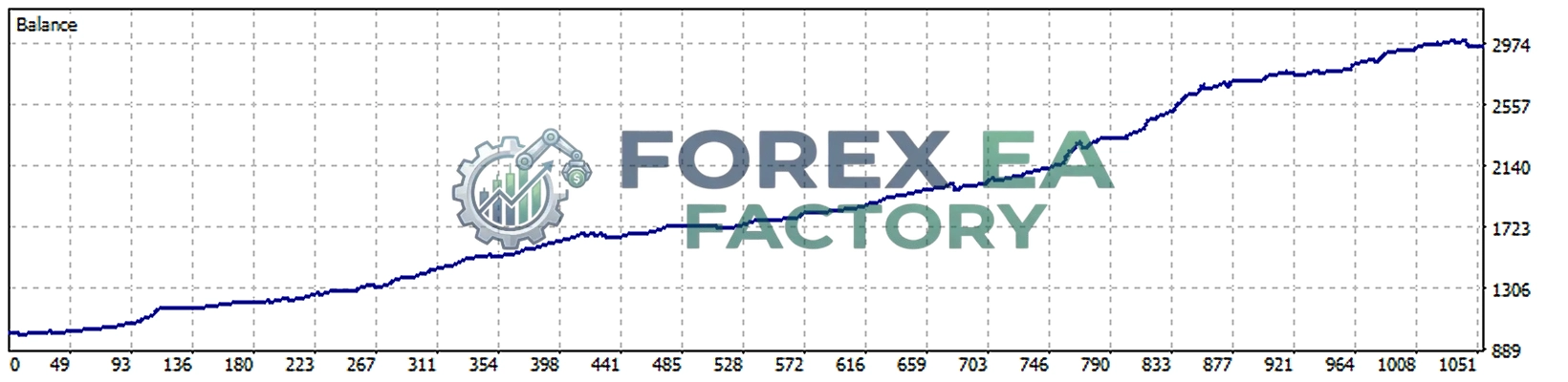
The most important limitation of this backtest is that it represents a single broker, a single symbol suffix, and a specific testing window. The vendor documentation explicitly warns that broker conditions, spreads, execution quality, and VPS latency can significantly influence live results. The backtest’s 99% real-tick modelling is a strong data-quality indicator, but it does not eliminate the difference between simulated execution and live broker execution.
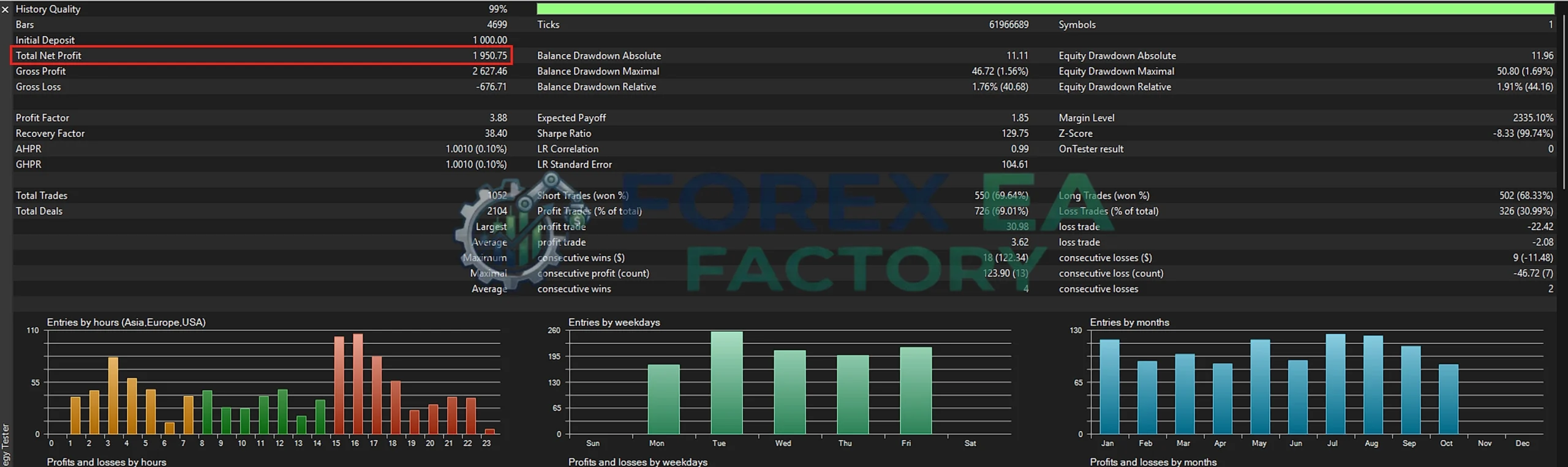
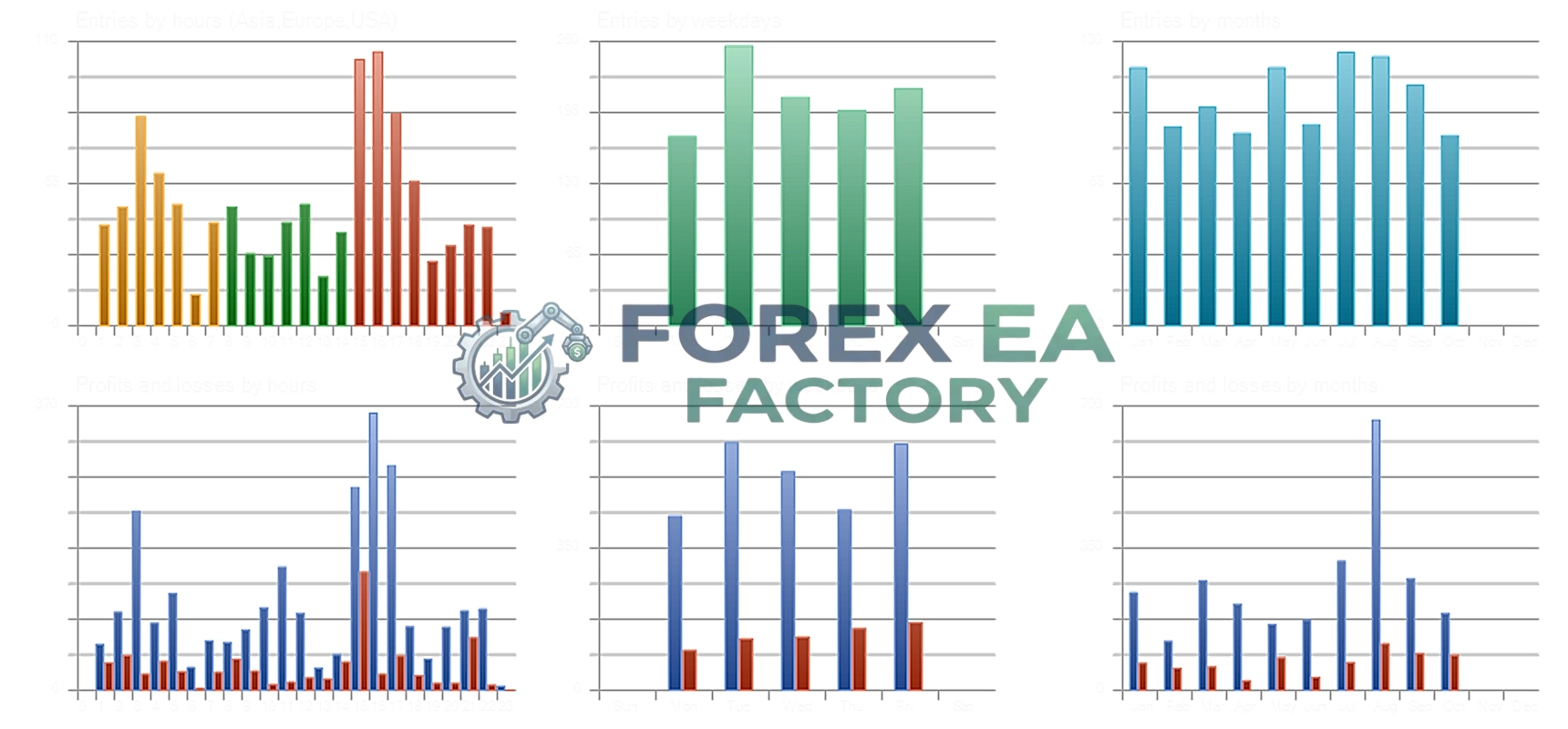
The second limitation is the backtest’s relationship to the supplied SET file. The report identifies the expert as Ghost Scalper v2.9, while the settings screenshot is labelled v5.20. This version discrepancy means the backtest cannot be treated as a direct forward-performance record for the exact v5.20 configuration shown. The SET file’s core activation logic (all four strategies, fixed 0.01 lots) may be similar, but the internal engine, trailing logic, and slippage handling have changed across versions. The backtest should therefore be read as evidence of the strategy family’s historical behaviour, not as a verified simulation of the v5.20 SET file.
Live Trading Results Analysis
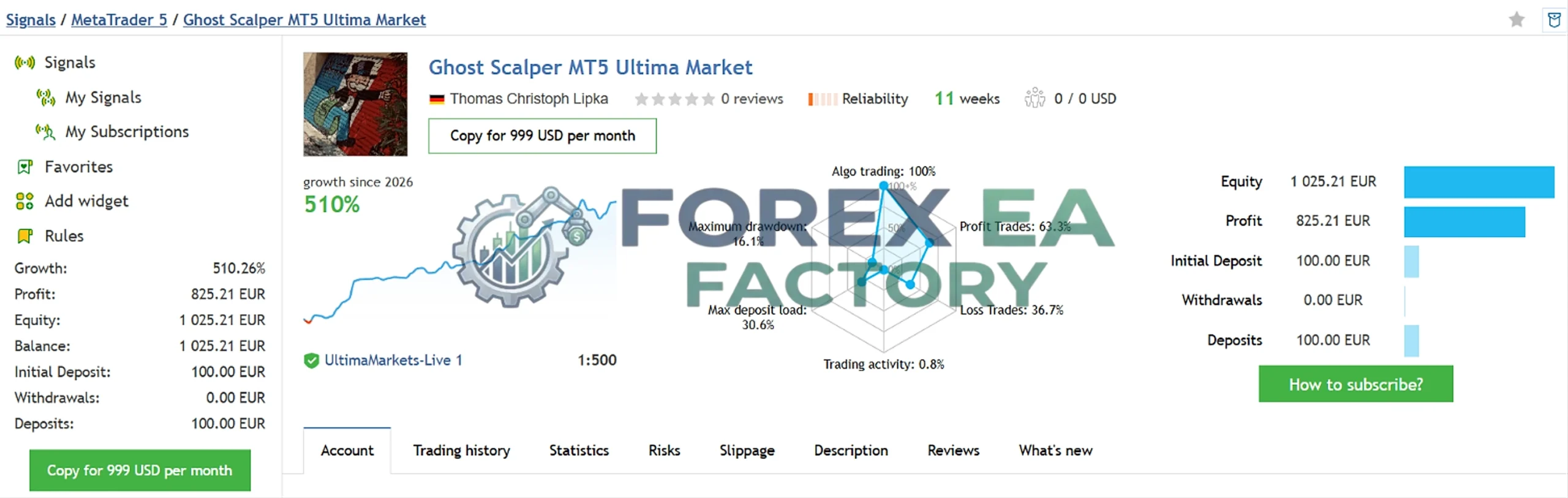
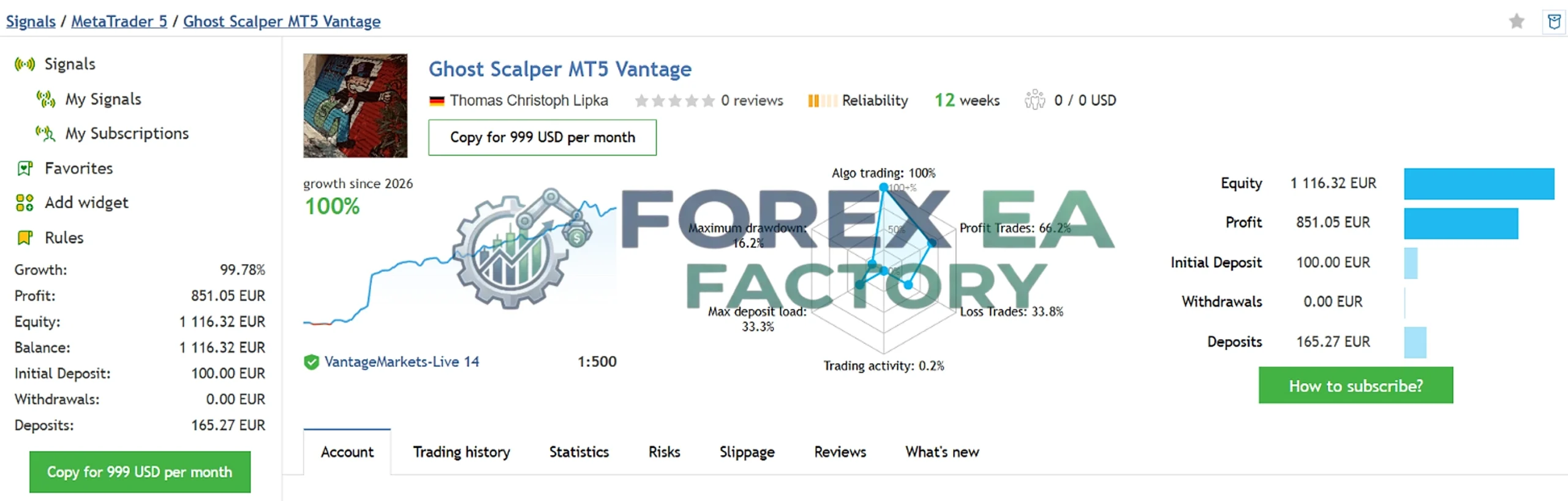
The supplied live-signal images show two MQL5 signals operating on different brokers. These are not backtests. They represent live or demo account tracking and should be interpreted separately from the historical simulation.
| Signal | Broker | Growth | Profit | Equity | Maximum Drawdown | Profit Trades | Initial Deposit |
|---|---|---|---|---|---|---|---|
| Ghost Scalper MT5 Ultima Market | UltimaMarkets-Live 1 | 510.26% | 825.21 EUR | 1,025.21 EUR | 16.1% | 63.3% | 100.00 EUR |
| Ghost Scalper MT5 Vantage | VantageMarkets-Live 14 | 99.78% | 851.05 EUR | 1,116.32 EUR | 16.2% | 66.2% | 100.00 EUR |
The live signals show substantially higher drawdown than the backtest: approximately 16% maximum drawdown on both accounts, compared with the backtest’s 1.69% equity drawdown. This is the single most important observation from the evidence set. The live accounts have experienced drawdowns roughly ten times larger than the supplied backtest, which is a common divergence between simulated and live execution in scalping systems. The live profit trades are also lower (63.3% and 66.2%) than the backtest win rate (69.01%).
These signals are publicly trackable, which adds a degree of credibility that a static screenshot cannot provide. However, they are short-duration signals (11 and 12 weeks, respectively) and operate on different brokers. They should not be combined with the backtest figures into a single performance claim. The vendor documentation also states that live results do not guarantee future performance.
Ready to evaluate Ghost Scalper MT5? 💠Download: View product details & Download the tool here
Settings Limitations and Important Precautions
The supplied SET file leaves several important areas to the EA’s internal logic or to inputs not shown in the screenshot. Traders should be aware of the following limitations before applying it.
Version and Backtest Mismatch
The settings screenshot is labelled v5.20, while the supplied backtest report identifies Ghost Scalper v2.9. The backtest should not be assumed to be a direct simulation of the exact v5.20 configuration. The core activation and lot-sizing logic may be consistent, but the internal execution engine, trailing behaviour, and slippage handling have evolved. A trader relying on the backtest as evidence for the v5.20 SET file should recognise this gap.
No Visible Limit on Simultaneous Exposure
The SET file does not expose a maximum number of open positions, a maximum total lot size, or a daily loss limit. With four strategies active and each on 0.01 fixed lot, the combined exposure is determined by the EA’s internal pending-order and position-management rules. Traders who want a hard cap on exposure would need to check whether such controls exist in other input groups or rely on the EA’s internal protection mechanisms.
Risk Percentage Values Are Inactive
The 0.25% risk values for each strategy are visible but do not affect the supplied configuration because every strategy is set to Fixed Lot. A trader who switches one or more strategies to Risk % should understand that the combined risk across four independent strategies can exceed 0.25% if multiple entries trigger simultaneously.
Broker and Execution Dependence
The vendor documentation explicitly notes that broker conditions, account type, spread, liquidity, VPS quality, and actual order execution can significantly influence results. The live signals already show higher drawdown than the backtest, and different brokers may produce different outcomes with the same SET file. Low-spread ECN accounts and stable VPS environments are recommended by the vendor.
Undocumented “HIGH SPEED” Component
The visible label “HIGH SPEED default: OFF | optional SM..” suggests an execution-speed-related option alongside the dashboard setting. The truncated text and the absence of a full explanation in the supplied materials mean the exact behaviour of this component cannot be confirmed. The dashboard is clearly disabled, but the speed-related portion should not be assumed to be a simple on/off switch without further documentation.
How to Apply and Verify the Recommended Settings
The following steps are specific to loading and checking the supplied Ghost Scalper MT5 SET file. They do not replace the general EA installation guide.
1. Open the EA Inputs tab. Attach Ghost Scalper MT5 to an XAUUSD H1 chart and open the Inputs window.
2. Load the SET file. Use the “Load” button in the Inputs window to select the supplied SET file. Confirm that the parameter names populate the input list.
3. Verify the Entry Mode. Check that DEFAULT: Ghost A + B + C + D is selected. If only a subset of strategies is intended, change this value before proceeding.
4. Verify the per-strategy lot settings. Confirm that Ghost A, B, C, and D are each set to Fixed Lot with a value of 0.01. Check that the Risk (%) fields remain at their supplied values if Fixed Lot is the intended mode.
5. Check the magic numbers. Confirm that Ghost A uses 2101, Ghost B 2102, Ghost C 2103, and Ghost D 2104. These should not conflict with other EAs running on the same account.
6. Confirm the dashboard setting. The supplied file has the dashboard disabled. If visual monitoring is required, check whether the dashboard mode can be changed without altering the core strategy behaviour.
7. Run a demo test. Apply the SET file to a demo account with the intended broker and symbol suffix. Monitor the number of simultaneous pending orders, the combined lot exposure, and the drawdown behaviour before considering a live deployment.
📩 Free Support & Setup Help – Contact us 👉 Telegram Support
Common Settings-Related Problems
The following issues are relevant to the supplied configuration and the way it interacts with the EA’s multi-strategy structure.
EA does not open trades immediately
Ghost Scalper uses pending orders based on breakout setups and does not force trades on every candle. The vendor documentation states that extended periods without trading activity are normal. With all four strategies active, the absence of trades does not necessarily indicate a configuration error; it may simply reflect the absence of valid setups.
More simultaneous positions than expected
Because four strategies are active, the EA can hold multiple positions or pending orders at the same time. A trader who expects a single-strategy exposure may be surprised by the combined activity. The magic numbers make it possible to identify which strategy opened which trade.
Risk percentage settings appear inactive
If the Risk (%) fields are visible but the EA is using fixed lots, this is expected under the supplied configuration. The risk fields become active only when the corresponding strategy is switched from Fixed Lot to Risk %.
Backtest and live results differ
The live signals show higher drawdown than the backtest. This is not a settings error; it reflects differences in broker execution, slippage, spread, and market conditions. The vendor documentation explicitly warns about this divergence.
Settings Review Verdict
The Ghost Scalper MT5 settings SET file is a straightforward, full-activation configuration. It enables all four Ghost strategies, assigns each one a uniform 0.01 fixed lot, and keeps the risk-percentage fallbacks at 0.25% per strategy. The magic numbers are cleanly sequential, and the dashboard is disabled.
The configuration’s most important characteristic is its uniformity. It does not weight one strategy more heavily than another, and it does not impose a visible cap on combined exposure. The practical risk therefore depends on how often the four strategies trigger simultaneously and how the EA manages multiple open positions internally.
The backtest evidence is historically strong: a 3.88 profit factor, 69.01% win rate, and 1.69% maximum equity drawdown over a 1,052-trade sample. However, the backtest is labelled for v2.9, not v5.20, and the live signals show approximately 16% drawdown, which is a more realistic indication of the configuration’s risk profile. The SET file should be treated as a starting point for demo testing, not as a verified live-ready optimization. Traders should verify the per-strategy behaviour on their own broker and account size before applying it to live capital.
Frequently Asked Questions
What are the recommended Ghost Scalper MT5 settings?
The supplied recommended configuration enables all four Ghost strategies (A, B, C, and D), sets each strategy to Fixed Lot with a value of 0.01, and keeps the risk-percentage fallback at 0.25% per strategy. It also assigns sequential magic numbers 2101–2104 and disables the dashboard.
How do I load the Ghost Scalper MT5 SET file?
Attach the EA to an XAUUSD H1 chart, open the Inputs tab, click “Load,” and select the supplied SET file. Verify that the entry mode, per-strategy lot settings, and magic numbers match the values described in this review before running the EA.
What do the Ghost A, B, C, and D money-management settings mean?
Each Ghost strategy has its own independent lot-sizing control. “Fixed Lot” uses a constant lot size, while “Risk %” calculates lot size from a percentage of account equity. The supplied file uses Fixed Lot at 0.01 for all four strategies, with the risk-percentage fields left at 0.25% as an inactive fallback.
Can I change the default settings?
Yes. The entry mode can be changed to enable only a subset of strategies, the fixed lot values can be increased or decreased, and individual strategies can be switched to risk-based sizing. Any change to the lot mode or lot value should be tested on a demo account before live use.
Which settings influence trading risk the most?
The entry mode and the per-strategy lot settings are the most direct risk controls in the supplied file. Enabling all four strategies increases the number of potential simultaneous entries, and increasing the fixed lot from 0.01 raises the exposure per entry. The risk-percentage values become relevant only if the strategy is switched from Fixed Lot to Risk %.
Can the same settings be used on different trading pairs?
Ghost Scalper MT5 is documented as an XAUUSD (Gold) H1 Expert Advisor. The supplied SET file does not include pair-specific adjustments, and the backtest evidence is based on XAUUSD.m. Applying the same file to other symbols would not be supported by the supplied materials.
How should I test the configuration before live trading?
Run the SET file on a demo account with the intended broker and symbol suffix. Monitor the number of simultaneous pending orders, the combined lot exposure, the drawdown behaviour, and the frequency of trades across different market sessions. Compare the demo behaviour with the supplied backtest and live-signal evidence, but do not assume that past results will repeat.
Risk warning: Leveraged CFD and Forex trading involves substantial risk of loss. The backtest and live-signal results discussed in this review are historical and do not guarantee future performance. The supplied SET file should be tested on a demo account before any live deployment. Position sizing and overall account risk remain the responsibility of the trader.

Ghost Scalper MT5 live results: Four Gold Strategies Under the Microscope
Gold Reaper MT5 Review: Live Signal, Rating, and Real Risks
Dynamic Liquidity Intelligence MT5 + Review and Download
