


What is Benefit EA MT4 Review
Grid trading EAs have a reputation problem, and it is usually justified. Many of them bury risk behind attractive equity curves and then wipe accounts when the market trends without looking back. Benefit EA MT4 takes a different approach, or at least claims to. It is a MetaTrader 4 Expert Advisor that uses a non-indicative flexible grid strategy with special entry points derived from mathematical modeling of market patterns. According to the vendor’s MQL5 product page, the EA does not use stop-losses and closes all trades through take-profit or trailing stop mechanisms. It is built for hedging accounts and supports major pairs including GBPUSD, USDJPY, EURUSD, EURJPY, USDCAD, USDCHF, and AUDUSD on timeframes from M1 to H1.
📌 Vendor Website: Available on the official product page | MQL5
📌 Telegram Support: Join for updates, announcements, and support

My First-Hand Test Results
Before evaluating any performance claims, it is worth noting that the results below are sourced from third-party trackers and community forums, not from personal testing. Benefit EA has been tracked on Myfxbook under the developer name SimpleAT, and those public accounts offer the clearest picture of how the system behaves in live conditions.
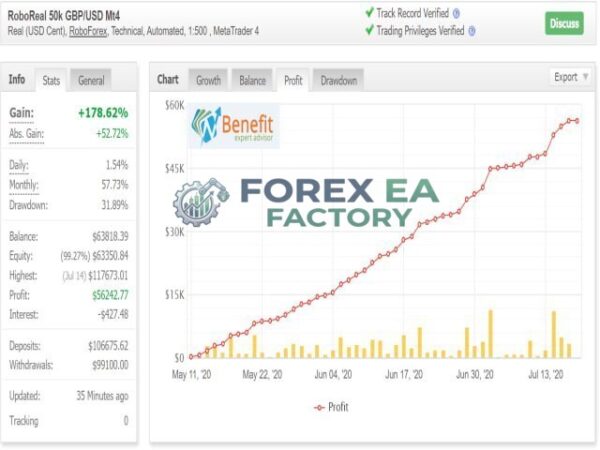
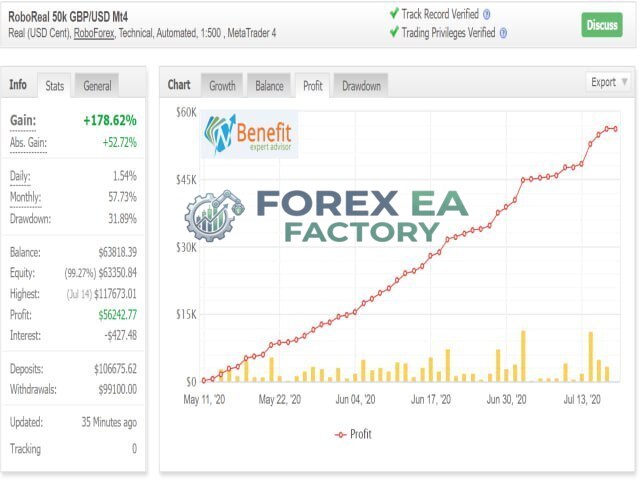
1. Benefit EA MT4 Results
• Growth: +178.62%
• Profit: $ 56,242.77
• Initial Deposit: $ 1,06,675.62
One Myfxbook account titled “CopyFX Roboforex by Benefit-EA GBP/USD M15” shows a reported gain of +406.6% with a maximum drawdown of 57.89% and a total pip count of -12,887.5. Another account, shows a gain of +810.62% with a 54.80% drawdown and -19,517.3 pips across 9,764 trades. A separate demo account running “Benefit 4.1 EU M15” shows a loss of -66.61% with an 88.60% win rate and -289.2 pips. The same tracker also lists “Benefit 4.1 GU M15” at -97.78% with a 98.37% win rate and -2,841.7 pips, and “Benefit 4.1 UJ M15” at -87.27% with a 99.95% win rate and -1,500.4 pips.
The pattern in these numbers is important. The accounts with the highest win rates are also the ones with the deepest losses. This is characteristic of grid and averaging strategies: most trades close in profit, but the losing series grow large enough to erase those gains. The pip counts across every account shown are negative, meaning the strategy is not capturing directional edge – it is relying on lot sizing and averaging to manage open positions.
Community discussions on forums such as Soehoe and Forex System add further context. One trader who ran the EA for a week on M15 noted that floating drawdown reached -$140 against $170 in closed profit, and warned that “if the market doesn’t go back to the same direction again to close all open positions, they will stay open forever.” Another trader on Forex System described the EA bluntly: “Very dangerous, it can blow up at any moment, you just have to turn away and it’s all gone. Expensive martingale”.
Key Features
The feature set is built around a flexible grid engine with multiple configurable risk controls, though the core strategy relies on averaging rather than directional entry edge.
• Non-Indicative Grid Engine: According to the vendor, the EA does not use standard indicators for entry. Instead, it relies on special entry points derived from mathematical modeling of market patterns.
• No Stop-Loss Design: The vendor states the EA does not use stop-losses. All trades are closed by take-profit or trailing stop.
• Risk Reduction System (RRS): The EA includes a configurable risk reduction system that activates after a set number of orders in a series. It closes partial positions and can open opposite-direction hedges in the next cycle to neutralize exposure.
• Configurable Lot Increments: The vendor states that lot increments can be planned, allowing traders to control how aggressively the grid scales up.
• Time Filter: A built-in time filter allows the EA to operate only during specified hours, based on the broker’s server time rather than the local operating system clock.
• Semi-Automatic Trading Buttons: The EA includes buttons that let traders block one or both trade directions, enabling manual control over the strategy’s bias.
• Multi-Pair Support: The vendor lists GBPUSD, USDJPY, EURUSD, EURJPY, USDCAD, USDCHF, and AUDUSD as supported currency pairs.
• Hedging Account Requirement: The EA requires a hedging account, which limits its usability on US-based brokers and many regulated entities that only offer netting accounts.
Why Should You Buy This?
The buying case for Benefit EA rests on whether you understand grid trading risks and have the capital to withstand deep drawdowns. This is not a beginner-friendly EA.
• Configurable Risk Controls: The Risk Reduction System gives traders a way to limit exposure during prolonged drawdowns, which is more than many grid EAs offer.
• Flexible Timeframe and Pair Support: The EA can run on M1 through H1 and supports seven major currency pairs, giving traders room to test different configurations.
• Long Track Record: The EA was first published on MQL5 in February 2016 and has been updated to version 5.1, meaning it has survived multiple market cycles.
• Documented Myfxbook Accounts: Publicly tracked accounts exist, which allows traders to see real drawdown behavior before committing capital.
• Not for Small Accounts: The vendor recommends a base deposit of 5,000 to 10,000 depending on the instrument. The Myfxbook data and forum discussions consistently show that small accounts are at high risk of blow-up.
• High Drawdown Risk: Every public Myfxbook account shows drawdowns above 50%, with some approaching 90%. This is not a conservative system, and the risk of account destruction is real.
Why Benefit EA MT4 Is Different
Most grid EAs on the market are simple averaging systems that open additional positions at fixed intervals when price moves against them. According to the vendor, Benefit EA uses a more structured approach with special entry points based on mathematical modeling, a configurable risk reduction system, and the ability to plan lot increments. The RRS is the standout feature: rather than allowing a grid series to grow indefinitely, it can close partial positions and open hedges in the opposite direction during the next cycle, which theoretically neutralizes exposure during adverse moves. That said, forum discussions suggest the RRS does not eliminate risk entirely – it manages it, and the public drawdown figures show that management is not always successful.
Benefit EA MT4 Strategy & Logic
Based on the vendor’s documentation and community testing, the EA follows a cycle-based grid process.
• Entry Point Identification: The EA uses non-indicative mathematical modeling to identify special entry points that provide a statistical advantage, according to the vendor.
• Initial Trade Opening: The first trade in a series is opened at the identified entry point, with a take-profit level set in points.
• Grid Expansion: If price moves against the position, the EA opens additional trades at calculated intervals, increasing lot sizes according to the configured increment plan.
• Take-Profit Calculation: The EA calculates a blended take-profit level across the entire series, so that when price retraces to that level, all open trades close in profit together.
• Risk Reduction System Activation: After a configurable number of orders, the RRS activates. It closes partial positions and can open opposite-direction trades in the next cycle to hedge exposure.
• Time Filter Application: If enabled, the EA only opens new series during the specified trading hours.
• No Stop-Loss: There is no hard stop-loss. The only exits are take-profit hits, trailing stop activations, or manual intervention.
• Cycle Reset: Once all trades in a series are closed, the EA begins a new cycle.
Risk Disclaimer: Grid and averaging strategies carry a high risk of substantial drawdown and account loss. Publicly tracked accounts for Benefit EA MT4 show maximum drawdowns exceeding 50%, with some exceeding 85%. Trading foreign exchange and CFDs is not suitable for all investors. Past performance does not guarantee future results. Always use risk capital you can afford to lose and consider seeking independent financial advice.
Optimized Settings Table
The following settings are based on the vendor’s recommendations and information from the MQL5 product page.
| Setting | Recommended Value |
|---|---|
| Platform | MetaTrader 4 (MT4) |
| Timeframe | M15 (default) |
| Currency Pairs | GBPUSD, USDJPY, EURUSD, EURJPY, USDCAD, USDCHF, AUDUSD |
| Min Deposit | 5,000 – 10,000 (depending on instrument) |
| Recommended Deposit | 10,000 or more |
| Leverage | 1:20 – 1:1000 |
| Account Type | Hedging account required |
| Product Type | Expert Advisor |
| Recommended Broker | ECN/STP with low spread and zero stop level |
The vendor’s default settings are for GBPUSD M15 with a 50,000 deposit and 1:500 leverage. The RRS_Profit_Percent parameter, which controls exit from prolonged drawdowns, is recommended at 70-90%.
How to Install Benefit EA MT4
Installation follows the standard MT4 Expert Advisor process. You will need a hedging account before proceeding.
1. Purchase and download the EA. You will receive an .ex4 file.
2. Open MetaTrader 4 and log in to a hedging account with your broker.
3. In the MT4 Navigator panel, right-click “Expert Advisors” and select “Refresh” so the platform recognises new files.
4. Copy the Benefit EA .ex4 file into the MT4 MQL4/Experts folder on your computer.
5. Restart MT4 or right-click the Navigator and choose “Refresh” again. The EA should appear under Expert Advisors.
6. Drag the EA onto a supported pair and timeframe (the vendor default is GBPUSD M15). In the settings window, configure the lot increment plan, RRS parameters, and time filter. Enable “Allow Algo Trading.”
7. Click “OK” and check that the smiley face icon appears in the top-right corner of the chart. Monitor the first few cycles closely before increasing lot sizes.
📩 Free Support & Setup Help – Contact us 👉 Telegram Support
Author Info
Benefit EA is developed by Vsevolod Merzlov, who operates under the MQL5 username Benefit-EA. According to the vendor’s MQL5 profile, the developer states they have been trading since 2009, creating automated systems since 2013, and earning from those systems since 2013. The vendor also notes that professional traders use their automated systems via the official website, benefit-ea.com. Beyond the MQL5 marketplace listing and the associated Myfxbook tracking accounts registered under the name “SimpleAT,” limited independent information is available about the developer’s background or track record outside of these platforms.
Is Benefit EA MT4 Worth It?
Benefit EA MT4 is a grid-based Expert Advisor with a long track record and a documented – if concerning – public performance history. The Myfxbook accounts show that it can generate returns, but they also show that it does so with drawdowns that regularly exceed 50% and occasionally approach 90%. The Risk Reduction System adds a layer of control that many grid EAs lack, but it does not eliminate the fundamental risk of averaging into losing positions.
This EA is suitable only for traders who fully understand grid strategy risks, have substantial capital to absorb deep drawdowns, and are willing to monitor the system actively. It is not suitable for beginners, small accounts, or anyone looking for a low-risk automated system. Test on a demo account for several months, start with the smallest lot sizes, and never risk more than you can afford to lose.
Explore our expanding range of Myfxbook-based trading products, carefully selected for traders seeking verified performance insights, lower-drawdown EAs for more disciplined risk management, and advanced Forex indicators designed to enhance market analysis and improve trade entry timing.
👉 Reviewed By – Daniel C

Aura Absolute MT4 v1.1 EA | No DLL | Build 1476 + Unlimited
Aura Absolute MT4 is a machine learning and smart grid expert advisor for MetaTrader 4, designed for nine major and cross currency pairs including EURUSD, GBPUSD and USDCAD. According to third-party analysis, it uses clustering to identify market patterns and dynamic grid spacing to adapt to volatility. The vendor claims a 1,607% gain on Weltrade-Live, though this figure is vendor-reported and not independently audited.
Chronos Algo MT4 v1.5 – Bulild 1471+ | Verified EURUSD
Chronos Algo MT4 is a low-frequency, high-precision Expert Advisor designed specifically for EURUSD on the H1 timeframe in MetaTrader 4. It combines five technical indicators - Heiken Ashi, MACD, RSI, CCI, and ADX - into a single confirmed entry signal, with an adaptive dynamic grid for trade management. According to the vendor, the system has been running on a real live account since 2022, with verified tracking showing +164.39% gain and 17.45% drawdown.
Gold Level Breakout Enhanced EA MT4 V2.0 – Gold Focus
Gold Level Breakout Enhanced EA MT4 is an automated breakout trading robot built specifically for XAUUSD on the MetaTrader 4 platform. With a stunning 94.5% win rate across 182 trades and a profit factor of 2.51, this EA demonstrates exceptional accuracy and strong risk management. Designed for M1 and M5 timeframes, it offers a compelling solution for traders seeking consistent gold trading performance with minimal losses.
Benefit EA MT4 Free Download
Included 100% FREE for Forex EA Factory VIP Members





Reviews
There are no reviews yet.