


What is Institutional SMC Robot Eclipse MT5?
Institutional SMC Robot Eclipse MT5 runs on the MetaTrader 5 platform and is built around Smart Money Concepts – the idea that price moves are driven by institutional order flow rather than retail indicators. According to vendor documentation and independent review coverage, the EA tracks structure breaks, order blocks, fair value gaps, and Quasimodo levels to identify potential entries. It is aimed at traders who already work with price-action setups and want automated execution of those ideas, including those preparing for prop firm evaluations. The appeal is not a black-box profit promise but a structured framework that lets you inspect why the chart attracted the system’s attention.
📌 Telegram Support: Join for updates, announcements, and support
What Stood Out When Researching This Tool
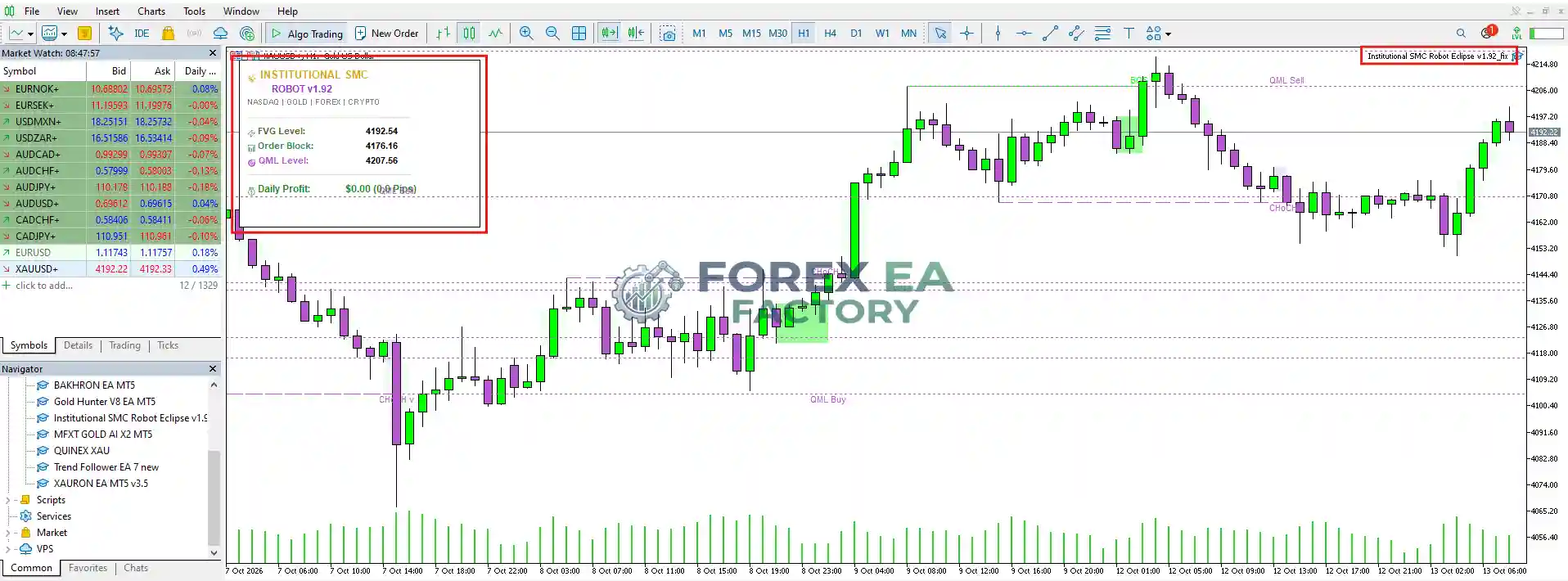
Public coverage of Institutional SMC Robot Eclipse MT5 – including the MQL5 market listing, independent review sites, and tracker data – points to a tool with broad configuration options and unusually transparent chart labeling. The EA draws BOS (break of structure), CHoCH (change of character), OB (order block), FVG (fair value gap), and QML (Quasimodo level) markers directly on the chart, so a user can visually trace the logic behind any trade signal.
However, independent verification remains limited. One tracker classifies the product in a risk class described as “no ceiling on loss,” with a largest measured drawdown of -32.0% recorded in late August 2026. A separate review notes that the linked gold and Nasdaq accounts show attractive early numbers but contain only seven gold trades and eleven Nasdaq trades – far too few to establish dependable performance across different market conditions. The vendor’s own preset notes also flag that prop firm guard features need to be explicitly enabled; a disabled switch cannot provide the advertised protection.
Key Features
• Structure Detection Engine: Scans price action using adjustable fractal sensitivity to identify swing highs and lows, then confirms directional bias through BOS and CHoCH events.
• Order Block & FVG Filtering: Locates unfilled order blocks and fair value gaps to filter trade signals, focusing attention on zones where institutional activity may have occurred.
• Quasimodo Level Mapping: Labels QML levels on the chart as an additional structural reference for potential reversal or continuation areas.
• Visual Dashboard: Displays live FVG level, order block price, QML level, and daily profit directly on the chart when InpShowDashboard is enabled.
• Prop Firm Guard Module: Includes configurable daily loss limits and total drawdown guards designed to pause trading before breaching funded-account rules – but these must be explicitly switched on.
• Position Scaling Controls: Recent versions added trailing support for additional positions opened at profit steps, with closure linked to the main position.
• Multi-Asset Presets: Vendor-recommended presets cover XAUUSD, US100, BTCUSD, and other instruments, with optimization possible via the MT5 strategy tester.
Why Should You Buy This?
• Chart Transparency: Unlike black-box EAs, the visual labels of the Institutional SMC Robot Eclipse MT5 let you inspect the structural reason behind each signal before and after execution.
• Prop Firm Orientation: The built-in drawdown guards and daily loss limits are designed for traders working through funded-account evaluations.
• Configurable Risk Profiles: Supports fixed lot, risk percentage, and preset auto risk levels ranging from very low to extreme, so position sizing can match your account constraints.
• Multi-Market Application: Vendor presets and modular settings allow optimization across gold, indices, crypto, and forex pairs rather than locking you into one instrument.
• Active Vendor Updates: Release history shows frequent refinements to entry logic, scaling behavior, and preset files, with support feedback noted in public reviews.
Who this is not for: Traders looking for a fully hands-off, set-and-forget system may find the configuration requirements and guard checks burdensome. The linked account history is short, and the risk class flagged by independent trackers means unlimited loss is structurally possible if guards are not configured correctly. Anyone unwilling to verify preset settings and monitor account exposure should look elsewhere.
Why Institutional SMC Robot Eclipse MT5 Is Different
Most automated trading tools in the Smart Money Concepts category either hide their logic behind generic signal outputs or focus narrowly on one instrument. Institutional SMC Robot Eclipse MT5 takes a different approach by making the structural interpretation visible on the chart – BOS, CHoCH, order blocks, and fair value gaps are labeled in real time – and by building prop firm risk controls directly into the execution layer. According to the vendor’s MQL5 documentation, the system also supports deep optimization across asset classes, allowing traders to generate their own preset files rather than relying solely on vendor defaults. The trade-off is that this openness demands more user involvement in setup and verification.
Institutional SMC Robot Eclipse MT5 Strategy & Logic
Based on the vendor’s official overview and independent review analysis, the EA follows a sequential decision process:
• Market Structure Assessment: The algorithm continuously scans price action using adjustable fractal sensitivity to identify dynamic swing highs and swing lows.
• Structure Confirmation: It detects BOS and CHoCH events in real time, confirming whether the current institutional trend is continuing or reversing.
• Liquidity & Imbalance Identification: The system locates unfilled order blocks and fair value gaps, using them as filters to qualify potential trade opportunities.
• Entry Execution: After structural confirmation, the EA opens positions and calculates dynamic stop-loss and take-profit levels based on local swing structure or a risk-reward ratio.
• Dynamic Risk Control: Integrated trailing stop management, spread protection, and prop firm drawdown limits are designed to protect account equity – provided the relevant inputs are enabled and correctly configured.
Risk Disclaimer: Trading forex, CFDs, and cryptocurrencies carries significant risk of loss and is not suitable for every investor. Past performance, vendor-reported results, and linked account history do not guarantee future outcomes. The product has been classified by at least one independent tracker as having no ceiling on loss, meaning account equity can be depleted if risk controls are not properly set. Always test on a demo account and verify settings before committing real capital. You are solely responsible for your trading decisions.
Optimized Settings Table
| Setting | Recommended Value |
|---|---|
| Platform | MetaTrader 5 (MT5) |
| Timeframe | H1 (vendor-recommended for XAUUSD) |
| Currency Pairs | XAUUSD, US100, BTCUSD, major forex pairs (vendor presets) |
| Min Deposit | $200 / €200 (vendor-stated minimum) |
| Recommended Deposit | $300+ for standard lot execution (vendor suggestion) |
| Leverage | Not specified by vendor; linked accounts used 1:500 |
| Account Type | Cent, Micro, Standard, ECN, Raw Spread, Hedge |
| Product Type | Expert Advisor |
| Recommended Broker | Vantage Markets and FPTrading |
How to Install Institutional SMC Robot Eclipse MT5
1. Open MetaTrader 5 and log in to your broker account. Ensure Algo Trading is enabled in the toolbar.
2. In MT5, go to File > Open Data Folder, then navigate to MQL5 > Experts.
3. Copy the EA file (.ex5) into the Experts folder. Restart MT5 or right-click in the Navigator and select Refresh.
4. Drag the EA from the Navigator onto a chart of your chosen instrument (e.g., XAUUSD H1).
5. In the EA settings window, enable InpEnableVisuals and InpShowDashboard to see chart labels and the live panel.
6. Load the vendor-provided preset file for your instrument if available, or configure risk parameters manually. Verify that any prop firm guard inputs are set to true before going live.
📩 Free Support & Setup Help – Contact us 👉 Telegram Support
Is Institutional SMC Robot Eclipse MT5 Worth It?
Institutional SMC Robot Eclipse MT5 offers a transparent, configurable approach to Smart Money Concepts trading on MT5, with chart labeling that lets you inspect the structural logic and prop firm guards that can be tuned to funded-account rules. The main caveats are the short live-account history, the need to actively verify that guard features are enabled, and the independent risk classification that flags unlimited loss potential if safeguards are neglected. It may suit traders who already understand SMC concepts and want automated execution with visual confirmation, but anyone seeking a fully passive system should weigh the setup requirements carefully. As always, test on demo first and confirm every setting before risking real capital.
Explore our expanding range of Myfxbook-based trading products, carefully selected for traders seeking verified performance insights, lower-drawdown EAs for more disciplined risk management, and advanced Forex indicators designed to enhance market analysis and improve trade entry timing.
👉 Reviewed By – Daniel C

Atherion Zenith AI EA MT5 V1.1 – Gold Automation for XAUUSD
Atherion Zenith AI EA MT5 is a fully automated Expert Advisor developed specifically for trading XAUUSD on the H1 timeframe in MetaTrader 5. Built around precision, structure, and risk control, it uses an AI-oriented analytical framework to filter market conditions and execute selective trades. The system features a real-time visual dashboard, smart trailing stop logic, and automated risk management. A public live signal is available for real-time monitoring.
Capital Guard EA MT5 V2.0 – SetFile + Unlimited | Low Risk
Capital Guard EA MT5 is a fully automated trading robot for MetaTrader 5, built around a high-probability strategy with an impressive 85.4% win rate and a maximum drawdown of just 5%. Based on verified trading results, this EA demonstrates strong risk control and consistent equity growth, making it a compelling option for traders seeking steady returns without excessive volatility.
Ghost Scalper MT5 V2.5 – No Grid | Martingale with Unlimited
Ghost Scalper MT5 is a fully automated multi-strategy Expert Advisor developed specifically for Gold (XAUUSD) on the H1 timeframe. Rather than constantly searching for trades, Ghost Scalper focuses on selected Support & Resistance breakout setups. The EA analyses completed candles, evaluates internal conditions, and only prepares a trade when a valid setup is detected. Version 2.5 integrates four independent strategies Ghost A, Ghost B, Ghost C, and Ghost D within a single EA, delivering verified live signal results with up to 180% growth and a maximum drawdown of 16.1%.
Institutional SMC Robot Eclipse MT5 Free Download
Included 100% FREE for Forex EA Factory VIP Members





Reviews
There are no reviews yet.