


What is Janus Zone EA MT5?
Janus Zone EA MT5 is an Expert Advisor built for MetaTrader 5, designed to trade XAUUSD (gold) on the H1 timeframe. Unlike EAs that rely on a single entry pattern, Janus Zone brings together a collection of zone-based trading engines under one interface. The vendor describes the system as a multi-engine approach where different entry models can be switched on or off depending on the trader’s preference and market conditions. This makes it relevant for gold traders who want more control over which trading logic is active, rather than accepting a one-size-fits-all strategy. The EA is positioned as a tool for traders who understand that automated gold trading carries risk and who want a system with visible risk-management controls.
➡️ Vendor Website: Available on the official product page | MQL5
➡️ Telegram Support: Join for updates, announcements, and support
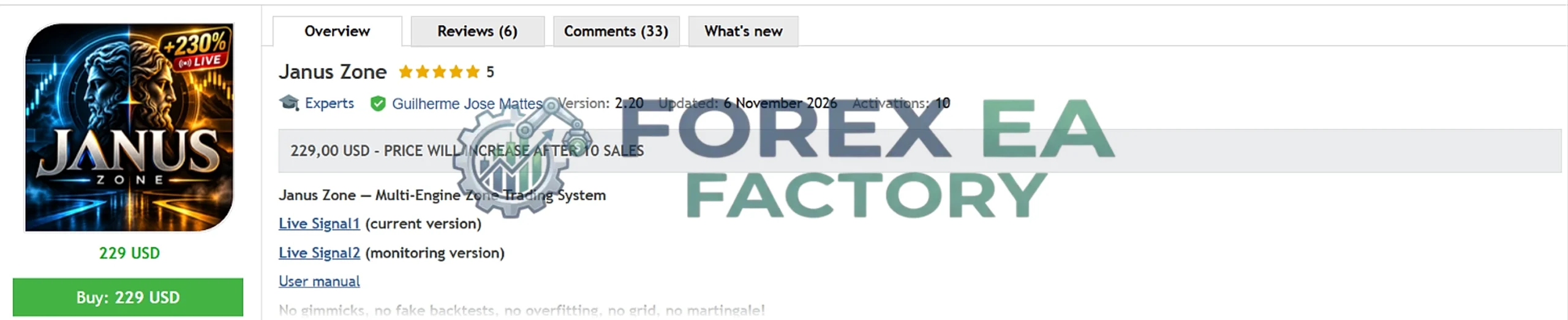
Available Performance Evidence
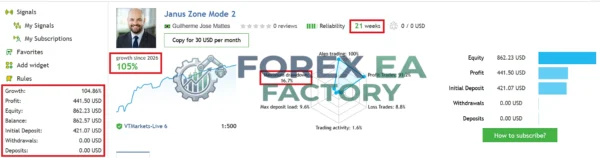
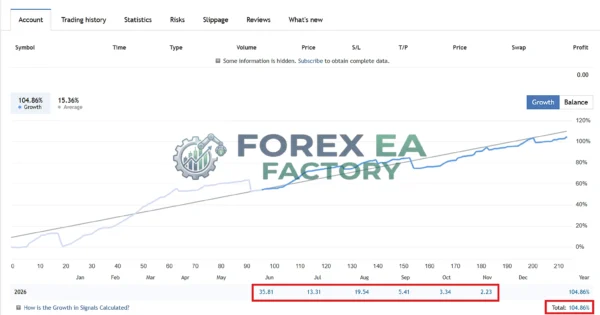
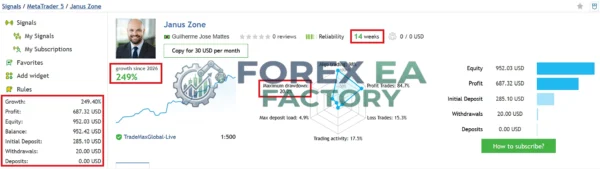
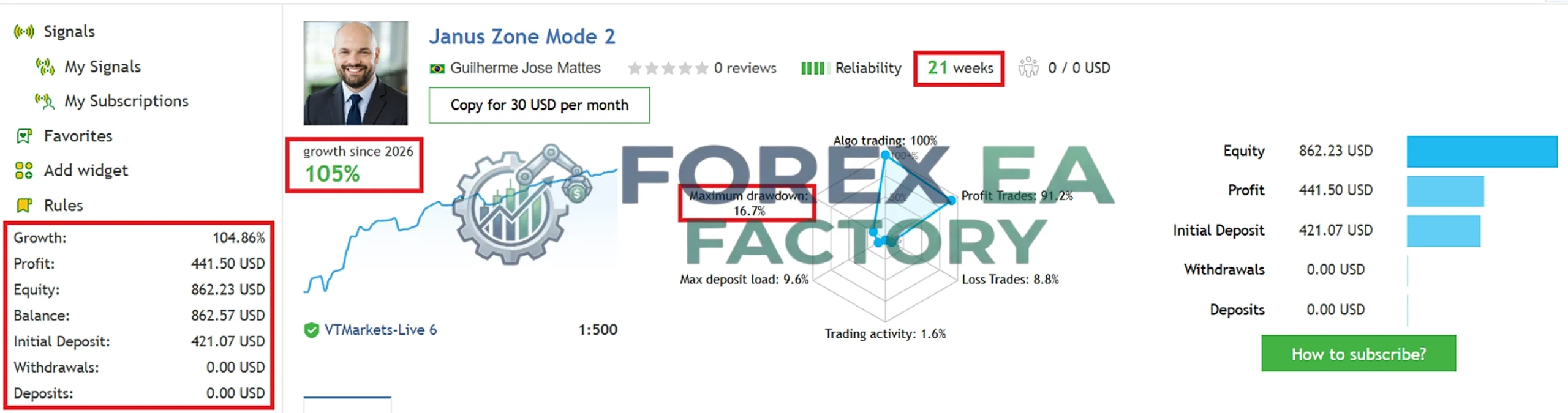
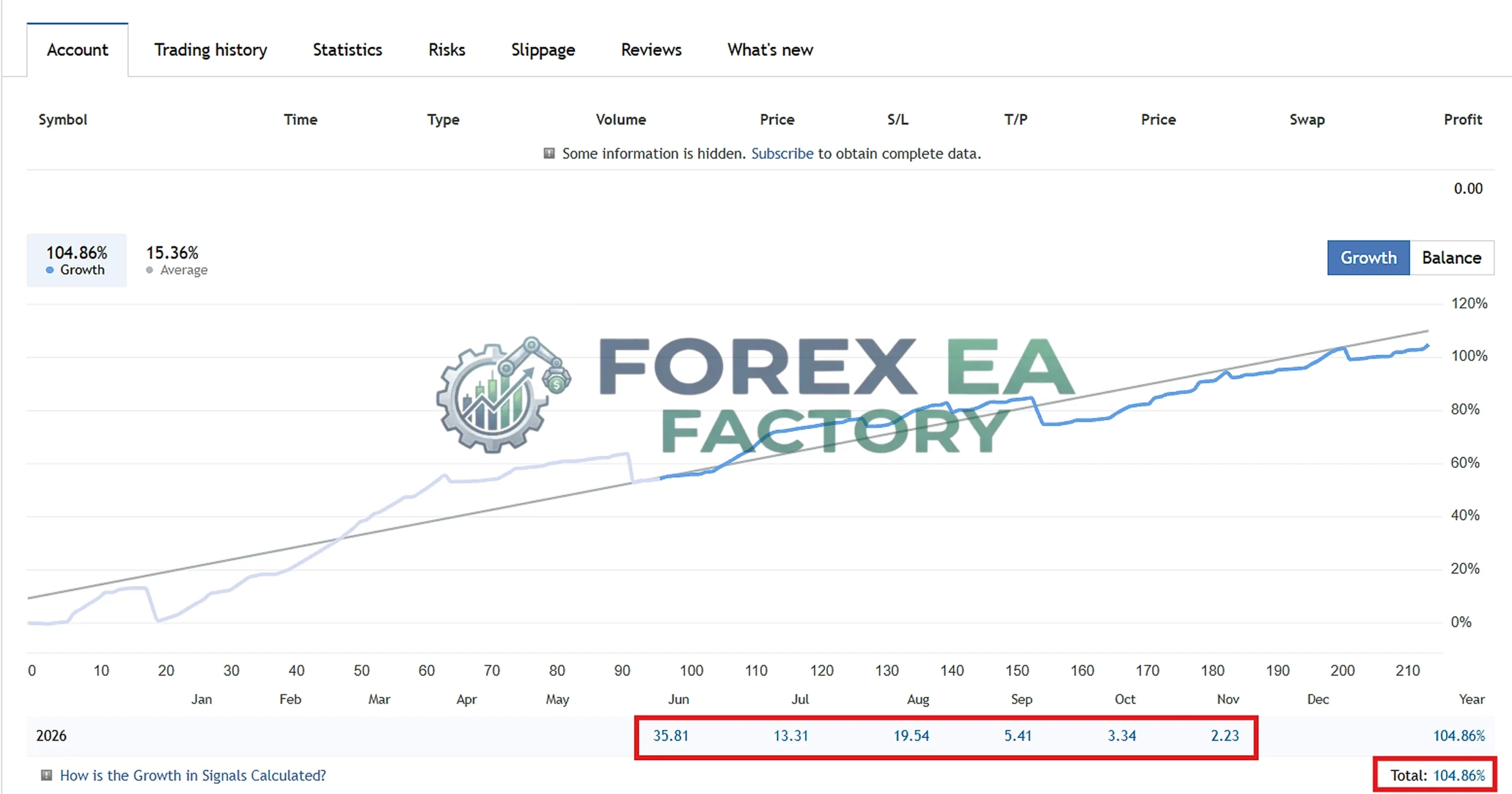
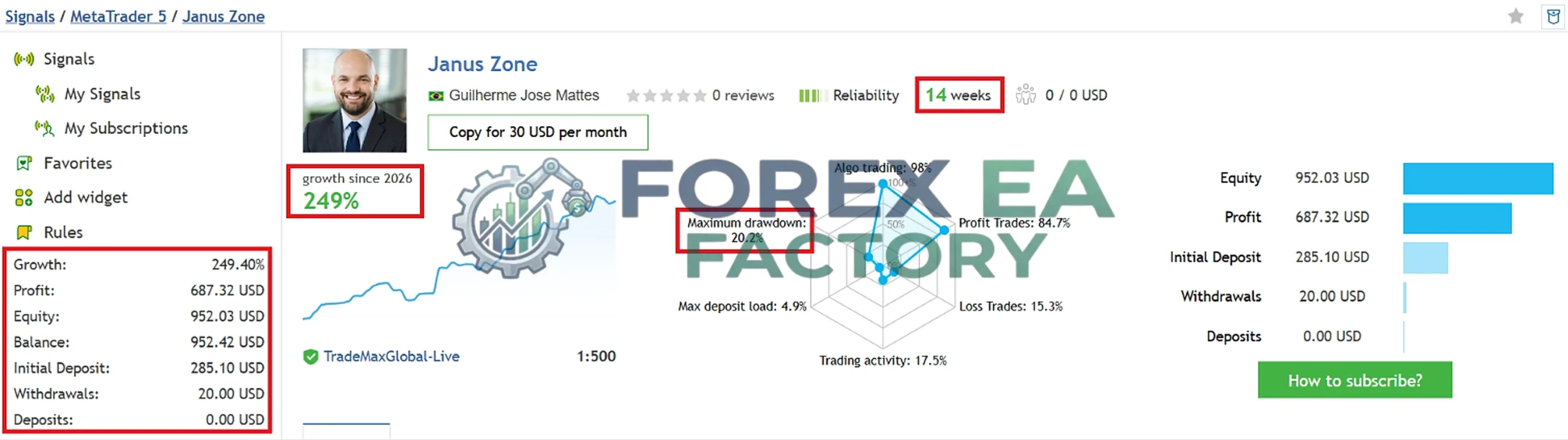
The vendor provides access to live signal accounts on MQL5, which show trading activity on real accounts. According to the vendor’s listing, Janus Zone has been running on separate live signals, and the published accounts display growth and drawdown figures. One of the signals shown in the vendor’s materials, labeled “Janus Zone Mode 2,” displays 105% growth since 2026 with a maximum drawdown of 16.7% and a 91.2% profit trade rate. Another signal labeled “Janus Zone” shows 249% growth since 2026 with a maximum drawdown of 20.2% and an 84.7% profit trade rate.
1. Janus Zone EA MT5 MQL5 Live signals | Check Live Proof
• Gain: +104.86%
• Profit: $ 441.50
• Drawdown: 16.7%
• Deposit: $ 421.07
2. Janus Zone EA MT5 MQL5 Live signals | Check Live Proof
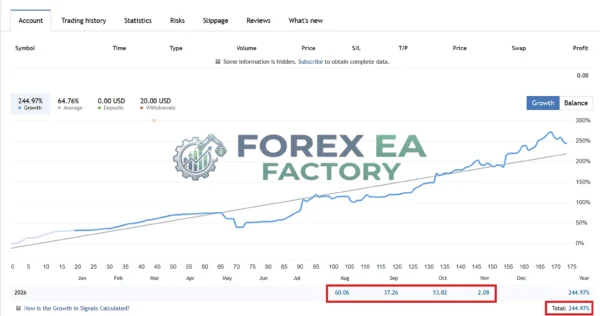
• Gain: +249.40%
• Profit: $ 687.32
• Drawdown: 20.2%
• Deposit: $ 285.10
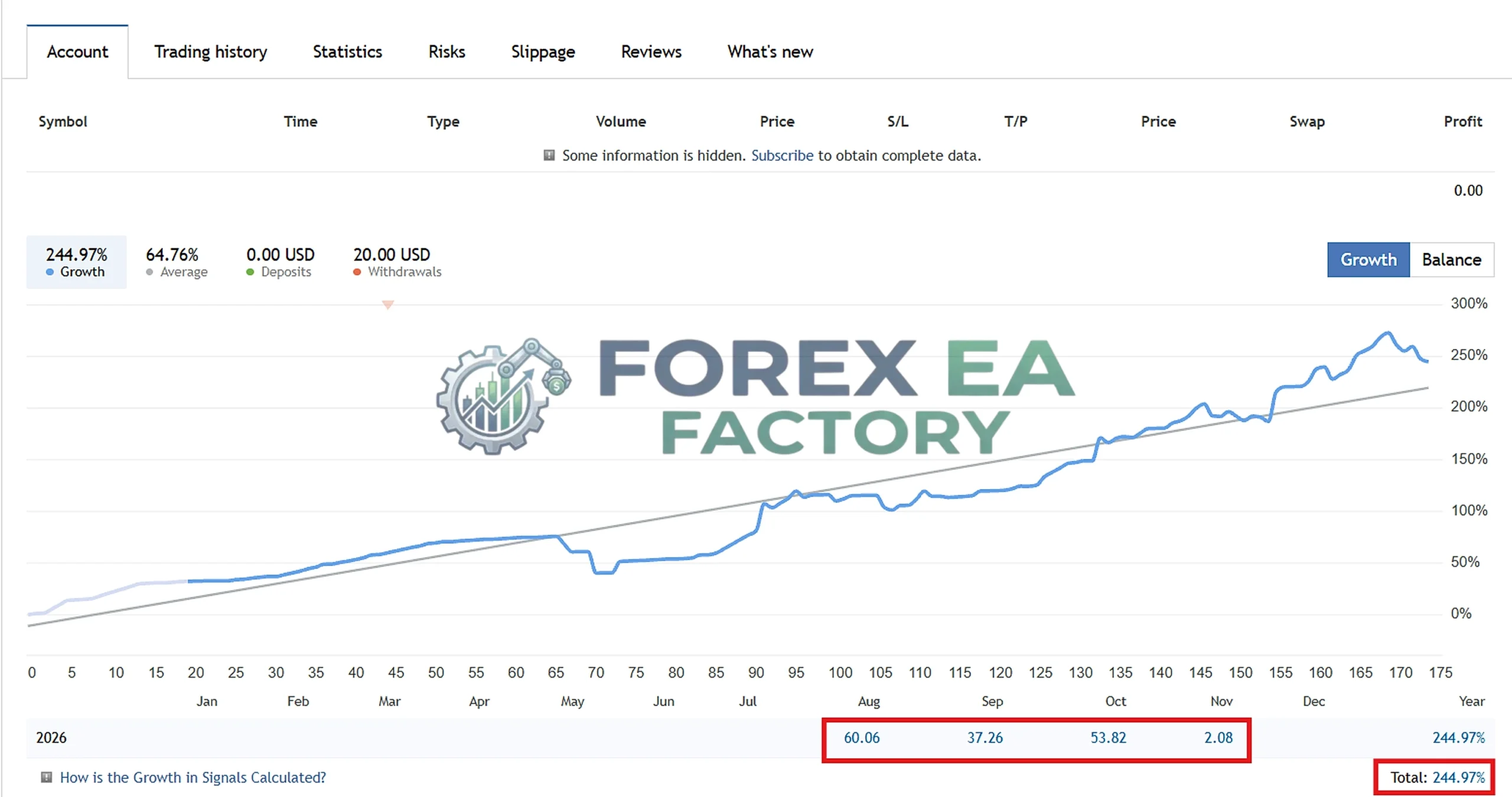
These figures are reported by the vendor and are visible on the linked MQL5 signals. It is important to note that these are vendor-published results on specific accounts with specific brokers and settings; they do not represent a guarantee of future performance, and the account histories are relatively short. No independent third-party audit of these results is provided within this description. Traders should review the live signal links directly and consider the limitations of short-term track records.
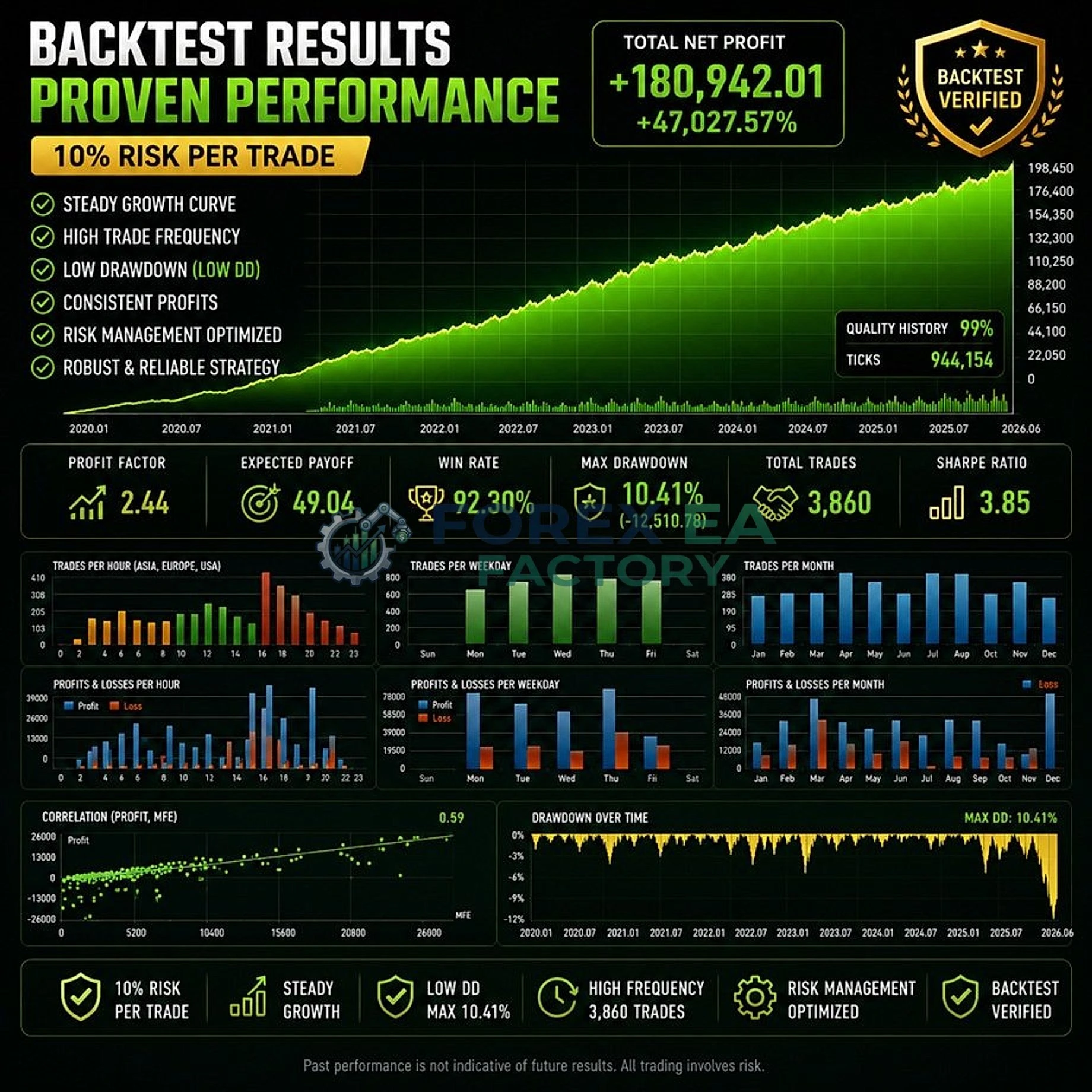
3. Janus Zone EA MT5 Back test results
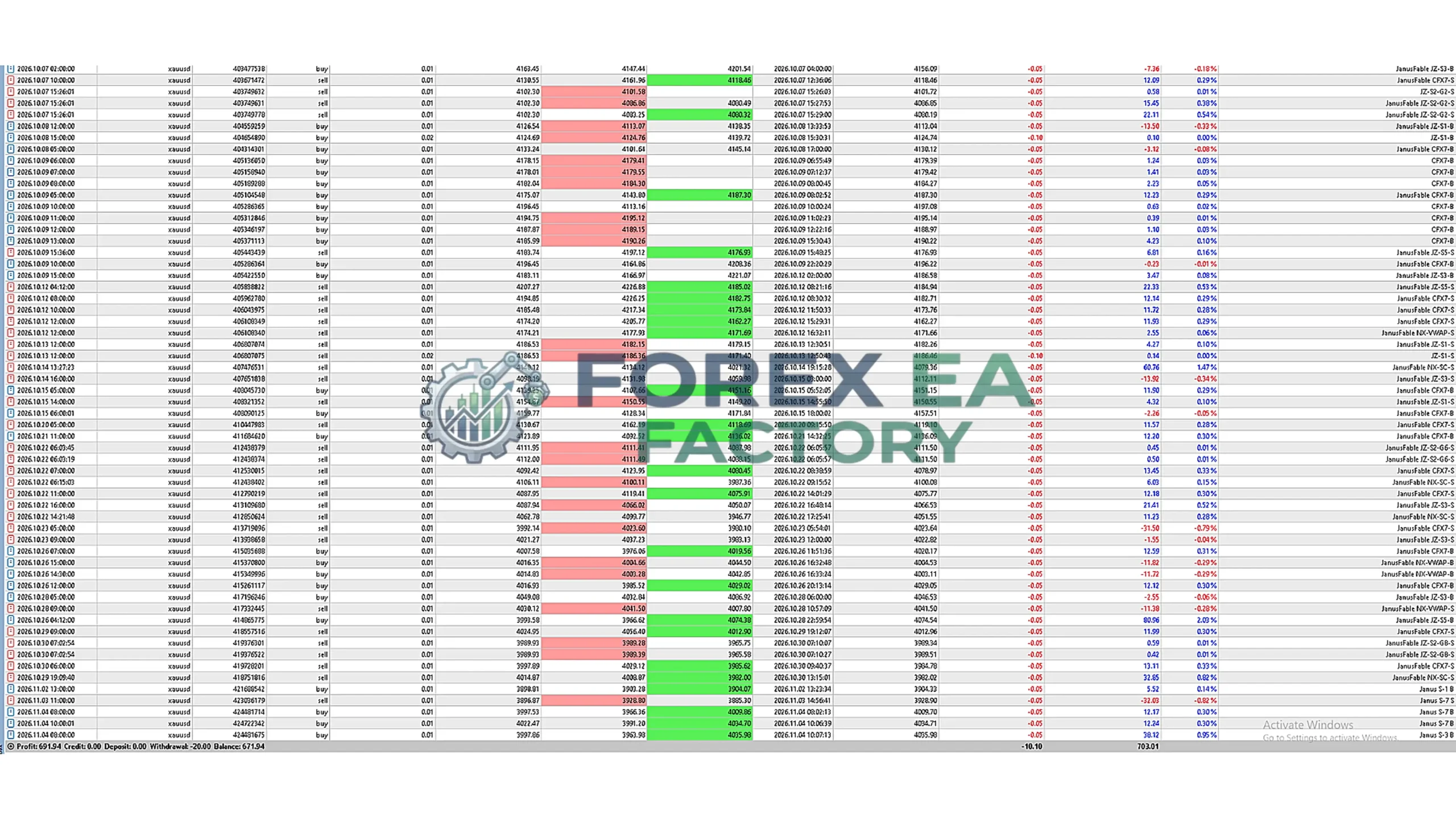
4. Janus Zone EA MT5 results
Key Features
Based on the vendor’s documentation, Janus Zone EA MT5 includes the following capabilities:
• 10 Independently Switchable Strategies: The EA exposes individual strategy toggles in the inputs menu, allowing traders to turn specific engines on or off without modifying code. The vendor describes the underlying logic as including zone fade/ride, corridor pullback, range reversion, liquidity sweep, retest, and session-based components.
• Automatic Risk Calculation: Lot sizing can be configured based on account balance, a fixed risk percentage, a maximum drawdown budget, or an auto-compounding method. This gives traders multiple ways to align position sizing with their risk tolerance.
• Daily Target Protection: The EA includes a daily profit and loss threshold that can lock in gains or limit losses within a trading day, taking floating profit and loss into account.
• Drawdown-Aware Money Management: An optional lot-sizing mode ties position size to a drawdown budget rather than a fixed lot number, allowing risk to adjust based on account equity conditions.
• Margin-Safe Order Engine: Before every order, the EA checks available margin, which helps avoid repeated rejected trades that can occur when an account lacks sufficient free margin.
• Streamlined Input Menu: The parameter menu is limited to essential settings: risk configuration, lot size, magic number, trade comment, daily target, and strategy switches. This reduces clutter and makes configuration more straightforward for traders who prefer not to navigate dozens of obscure inputs.
Why Should You Buy This?
• You want configurable strategy exposure on gold. The ability to toggle individual engines means you can test different combinations without needing programming knowledge. This is useful for traders who want to understand how different zone-based entry models behave on XAUUSD.
• You prefer built-in risk controls. Automatic lot sizing, daily target protection, and drawdown-aware money management provide layers of risk oversight that can be adjusted to your account size and comfort level.
• You trade XAUUSD on H1. The EA is designed specifically for a single chart and a single symbol, which simplifies setup and monitoring compared to multi-pair systems.
• You want to avoid grid and martingale mechanics. The vendor explicitly states that Janus Zone does not use grid or martingale techniques. Traders who are uncomfortable with those high-risk recovery methods may find this relevant.
• You value a focused parameter menu. If you prefer an EA that exposes only the settings that matter, rather than hundreds of options, the streamlined input structure reduces the learning curve.
Who may not find it suitable: Traders looking for a multi-currency EA, a system with a verified multi-year live track record, or a fully hands-off “set and forget” approach that requires no strategy selection may not find Janus Zone to be the right fit. The EA requires the user to decide which engines to enable, and its published performance histories are relatively short.
Why Is Janus Zone EA MT5 Different?
Many gold EAs on the market rely on a single entry logic, such as a moving average crossover or a breakout pattern. Janus Zone takes a different approach by packaging multiple zone-based engines into one product. The engines are described as having different entry conditions, meaning they may respond differently to trending, ranging, or volatile market regimes. The trader can choose which engines are active, effectively customizing the EA’s behavior without writing code.
Additionally, the inclusion of a drawdown-aware lot-sizing mode and a margin-checking order engine reflects an emphasis on practical account management rather than aggressive growth tactics. The vendor also states that the system was refined through live testing rather than relying solely on backtested optimization, although the provided live records are short and should be evaluated with that in mind.
Janus Zone EA MT5 Strategy and Trading Logic
According to the vendor’s documentation, Janus Zone operates on XAUUSD H1 using a collection of zone-based trading engines. The vendor describes the logic as combining zone fade/ride, corridor pullback, range reversion, liquidity sweep, retest, and session-based models. Each engine has its own entry conditions, and the user can enable or disable them individually. The EA checks available margin before executing trades and can manage position sizing through several risk modes: fixed balance-based, risk percentage, maximum drawdown budget, or auto-compounding. It also includes a daily target protection feature that monitors floating profit and loss and can stop trading for the day if a specified threshold is reached.
Optimized Settings Table
| Setting | Recommended Value |
|---|---|
| Platform | MetaTrader 5 |
| Timeframe | H1 |
| Currency Pairs | XAUUSD |
| Min Deposit | $250 USD |
| Recommended Deposit | $300 – $500+ |
| Leverage | 1:500 |
| Account Type | Raw Spread, ECN, or Zero accounts recommended by vendor |
| Product Type | Expert Advisor |
| Recommended Broker | Low-spread brokers offering Raw Spread, ECN, or Zero accounts |
How to Install the Janus Zone EA MT5
1. Download the Janus Zone EA MT5 files.
2. Open MetaTrader 5 and go to File > Open Data Folder to locate the MQL5 directory.
3. Place the EA file in the MQL5/Experts folder.
4. Restart MetaTrader 5 or right-click in the Navigator panel and select Refresh to load the EA.
5. Open an XAUUSD H1 chart and drag the Janus Zone EA from the Navigator onto the chart.
6. In the EA settings window, configure your risk parameters, enable or disable the desired strategy engines, and ensure the Algo Trading button is turned on.
📩 Free Support & Setup Help – Contact us 👉 Telegram Support
Author Information
Janus Zone EA MT5 is developed by Guilherme Jose Mattes, according to the MQL5 Market listing. The developer states that he began working in the trading robots market in 2017 and later started developing his own EAs after encountering limitations and scams in the industry. The MQL5 profile lists Janus Zone as one of his products, and the vendor page indicates active support and updates. Independent background information on the developer’s company or operating history beyond the MQL5 profile is limited.
Is This Janus Zone EA MT5 Worth It?
Janus Zone EA MT5 may be worth considering for gold traders who want a configurable, zone-based EA with multiple strategy toggles and built-in risk controls on XAUUSD H1. Its strengths include the ability to customize which engines are active, automatic lot sizing options, and a daily target protection feature. However, the publicly available live results are short in duration, and the vendor does not specify a minimum deposit or leverage requirement. Prospective buyers should review the live signal accounts directly, test the EA on a demo account, and ensure the risk settings align with their own tolerance before committing capital.
Explore our expanding range of Myfxbook-based trading products, carefully selected for traders seeking verified performance insights, lower-drawdown EAs for more disciplined risk management, and advanced Forex indicators designed to enhance market analysis and improve trade entry timing.
👉 Reviewed By – Daniel C

Gold Trap MT5 v4.27: XAUUSD Grid & Basket Recovery EA
Gold Trap MT5 is a fully automated Expert Advisor built exclusively for XAUUSD on the MetaTrader 5 platform. It combines a proprietary Gold Trap indicator with a multi-layer filtering system and a basket recovery engine to manage gold trades. This review breaks down how the grid logic works, what the vendor-recommended settings are, and the real risks you need to understand before running it on a live account.
PolyGold Scalper MT5 + SetFiles: No DLL | Unlimited
PolyGold Scalper MT5 is a short-term XAUUSD scalping system that integrates Polymarket API sentiment data to generate forward-looking entry signals. It avoids grid and martingale, using dynamic virtual stops instead. This review breaks down how the sentiment feed works, the real drawdown data from live signals, the missing stop-loss concern, and the developer's product history.
Scraper Gold MT5 v3.7: Multi-Engine XAUUSD Breakout EA
Scraper Gold MT5 is a fully automated Expert Advisor designed specifically for XAUUSD trading. It utilizes four distinct breakout engines (Fixed Entry, Classic, Adaptive, Wide Exit) and avoids grid or martingale systems. This review breaks down the live signal data, extensive backtest results, the customizable settings, and the built-in risk protections like virtual trailing stops and news filters.
Janus Zone EA MT5 Free Download
Included 100% FREE for Forex EA Factory VIP Members





Reviews
There are no reviews yet.