


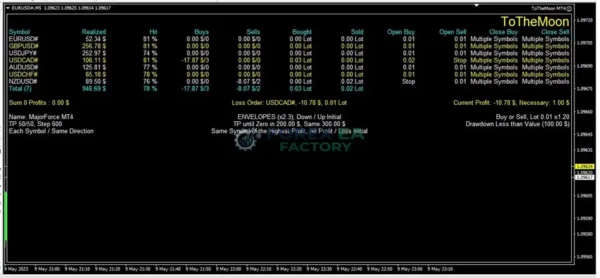

What is ToTheMoon MT4?
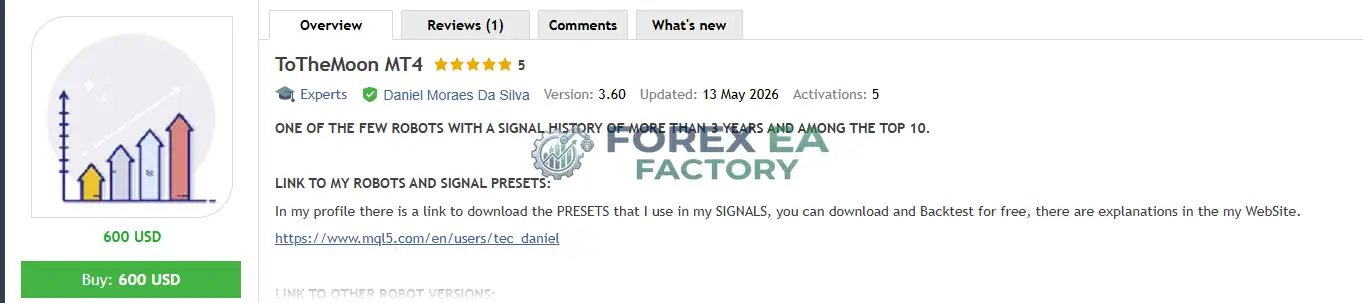
ToTheMoon MT4 runs on the MetaTrader 4 platform and is sold through the MQL5 Market as a preset-driven grid trading system. According to the vendor’s MQL5 product listing, it is one of the few robots on the market with a signal history of more than three years, with the developer maintaining multiple public signals that trade exclusively using the robot’s presets. The EA is designed for traders who want a configurable grid system without having to build their own presets from scratch, and it ships with recommended configurations for AUDCAD on the M5 timeframe. This review examines what the vendor documents, what the public signals show, and where the real risks sit.
📌 Vendor Website: Available on the official product page | MQL5
📌 Telegram Support: Join for updates, announcements, and support
My First-Hand Test Results
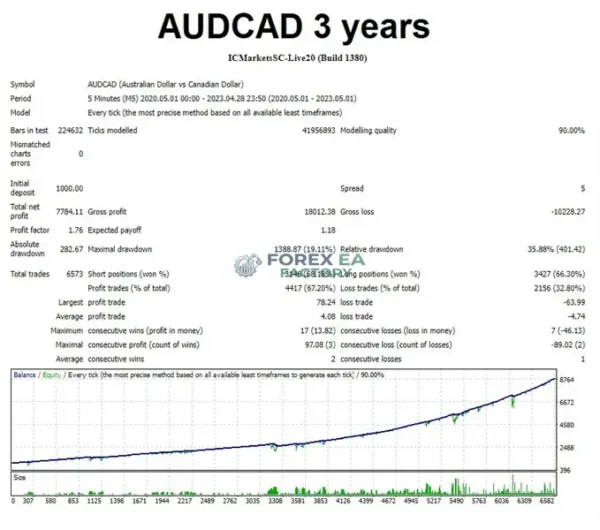
When researching this tool, the most notable aspect was not a single backtest but the length and consistency of the vendor’s public signal history. The vendor states that all published signals are traded by the robot using only preset changes, which means the live track record is directly tied to the product itself rather than a separate manual strategy. The vendor’s MQL5 listing also references backtesting data showing an AUDCAD M5 test over three years with an initial deposit of 1,000 USD, a net profit of 7,784.11 USD, a profit factor of 1.18, and a maximum drawdown of 282.67 USD (19.11% relative). These figures are vendor-published and should be treated as reported performance rather than independently verified results.
1. ToTheMoon MT4 Live signal Review | Check Live Proof
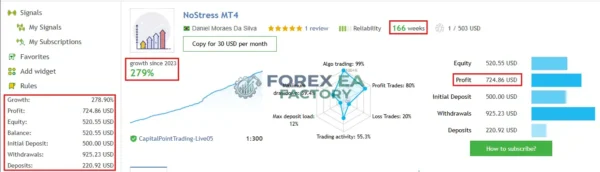
• Growth: +278.90%
• Profit: $ 724.86
• Initial Deposit: $ 500
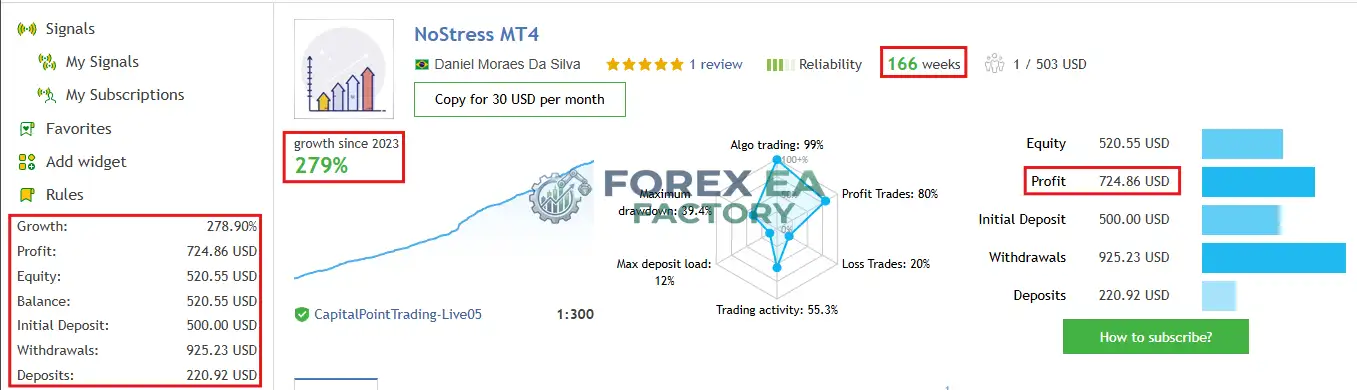

2. ToTheMoon MT4 Live signal Review | Check Live Proof
• Growth: +266.24%
• Profit: $ 692.26
• Initial Deposit: $ 500
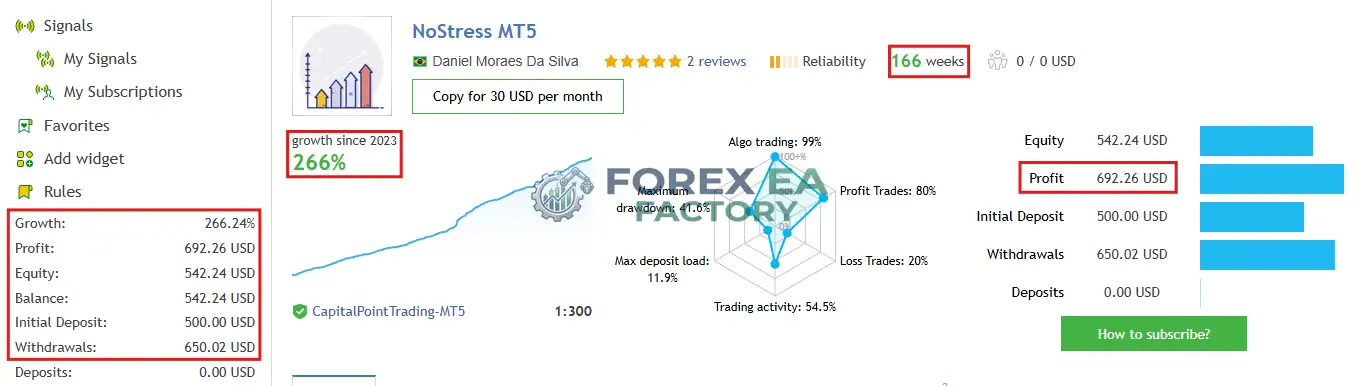
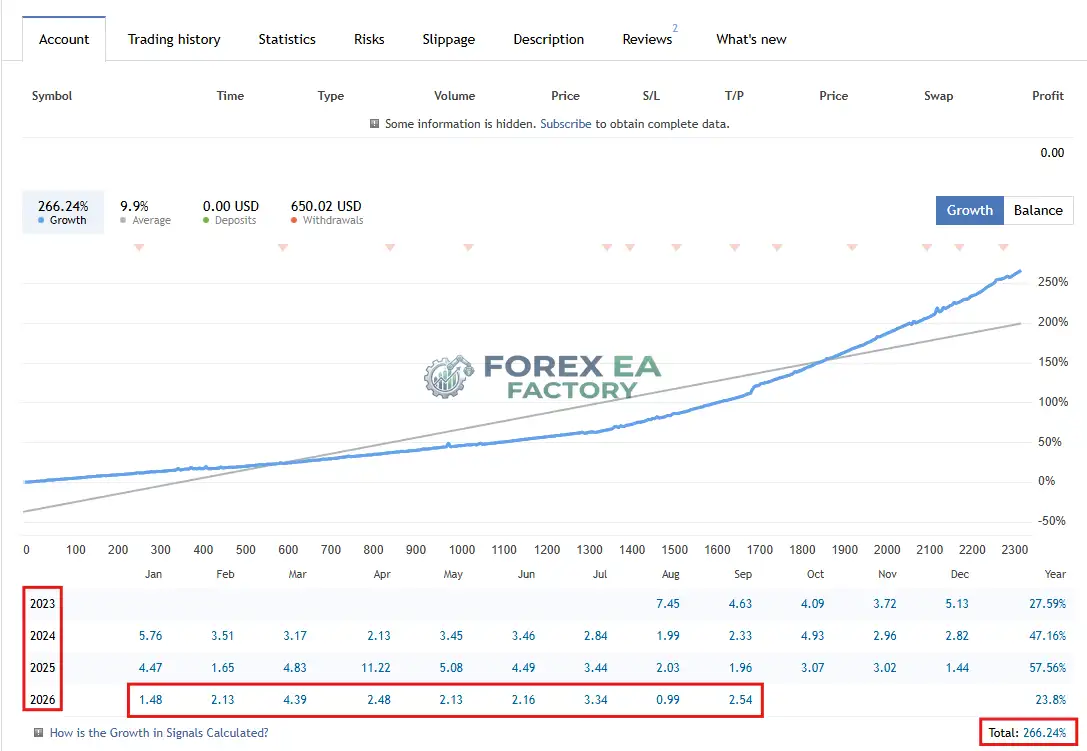
3. ToTheMoon MT4 Live signal Review
• Growth: +278.90%
• Profit: $ 724.86
• Initial Deposit: $ 500
The vendor’s public Myfxbook-linked signals show additional context. The NoStress MT5 signal, running for 166 weeks with an initial deposit of 500 USD, reports a total growth of 266.24% and a profit of 692.26 USD, with a maximum drawdown of 11.8% and an algo trading share of 99%. The NoStress MT4 signal, also at 166 weeks, reports 278.90% growth and 724.86 USD profit, with a 12% maximum deposit load.
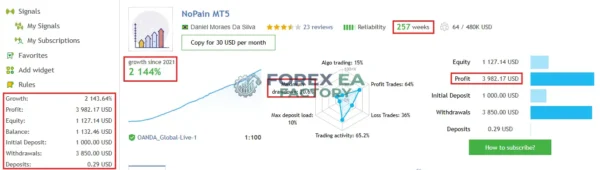
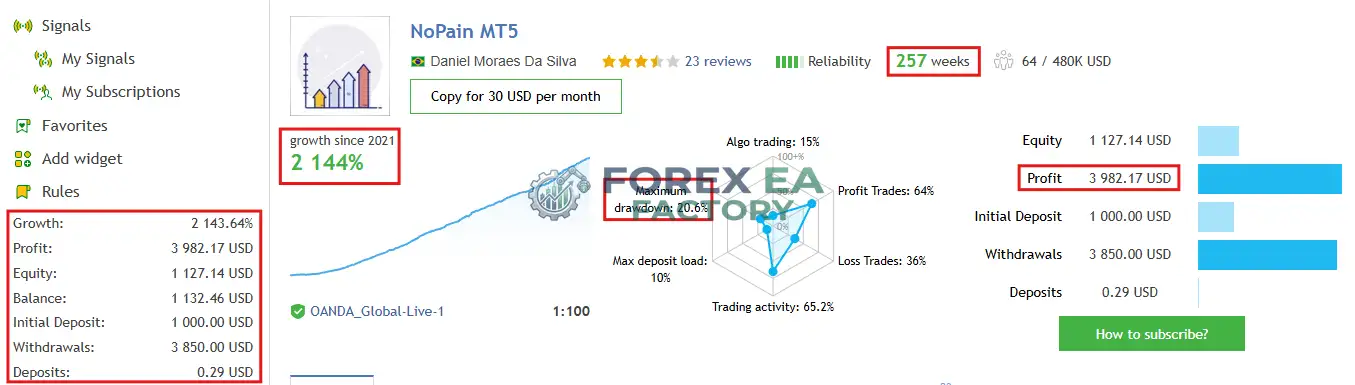
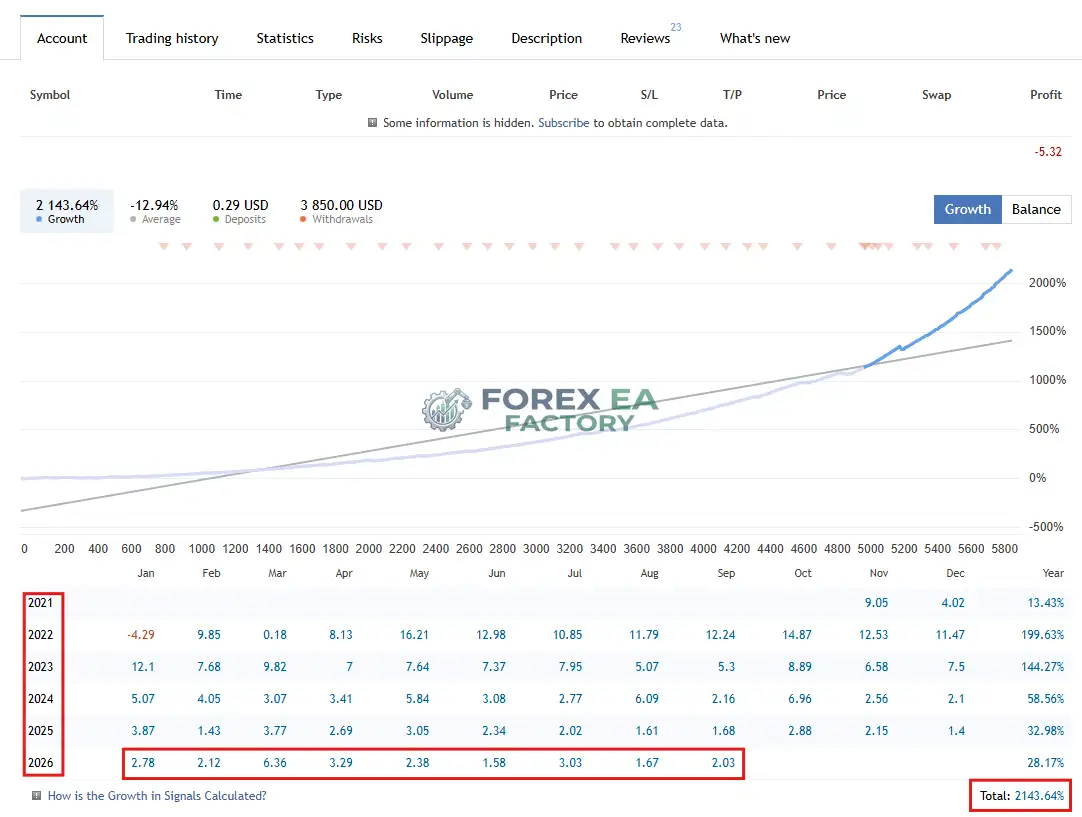
The NoPain MT5 signal, running for 257 weeks since 2021, reports a total growth of 2,143.64% and a profit of 3,982.17 USD on a 1,000 USD initial deposit, with a maximum drawdown of 20.6%. These signals are publicly visible on the vendor’s MQL5 profile and provide a long-running, real-account reference point, though they remain vendor-operated and should not be treated as guaranteed future results.
4. ToTheMoon MT4 Backtest resuls

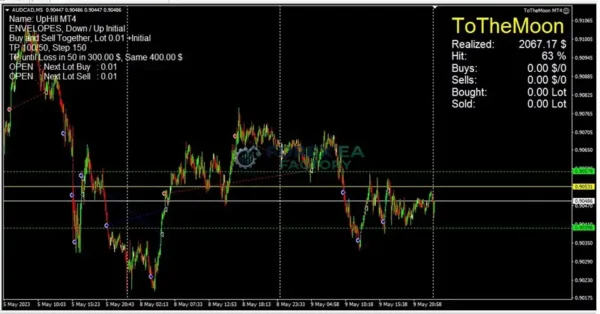
5. ToTheMoon MT4 Results


Key Features
• Grid Averaging Engine: The EA opens additional positions as price moves against the initial trade, calculating an average entry price to close the basket when price retraces.
• Preset-Driven Configuration: The vendor publishes ready-made presets containing symbol, timeframe, and recommended minimum balance in the second parameter, removing the need to build strategies from raw parameters.
• Multi-Symbol Trading Mode: Presets can operate across multiple symbols simultaneously, using orders from profitable symbols to help offset losses on others.
• Partial Basket Closing: According to the vendor, the EA closes portions of the basket at a loss to act as a smart stop-loss mechanism, aiming to reduce overall drawdown rather than holding every position indefinitely.
• Monetary Take Profit Option: The EA supports a take-profit expressed in account currency rather than only in points, which is useful for traders who manage risk in dollar terms.
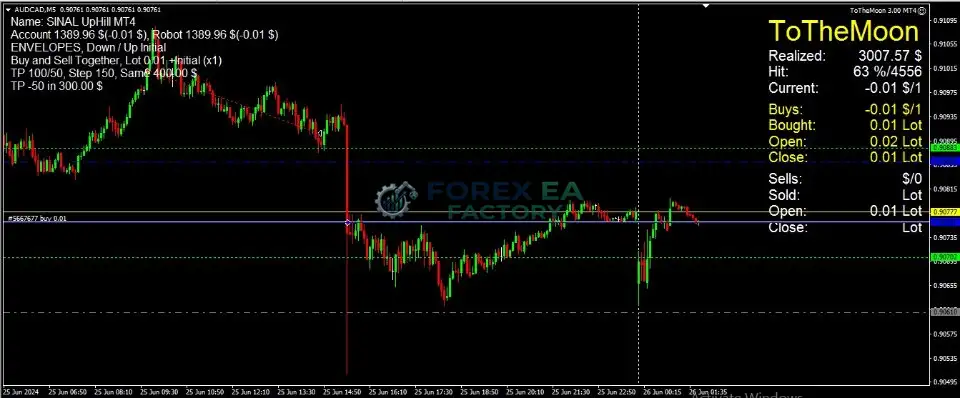
• Take Profit Until Loss in Points: As shown in the supplied MT4 screenshots, the EA can be configured to keep trading until a specific loss threshold in points is reached, at which point the basket is managed differently.
• Multiple Chart Signals: The supplied MT4 screenshots show the EA operating on AUDCAD M5, EURUSD M5, and AUDUSD M5 with different presets, demonstrating its multi-symbol capability in practice.
• Activation Policy: Purchases through MQL5 include five activations, which allows use across multiple computers or VPS instances, though each activation is consumed if the machine changes.
Why Should You Buy This?
• Long Public Track Record: The vendor maintains multiple signals running for over three years, which is uncommon for grid EAs and provides a longer observation window than a short backtest alone.
• Preset Simplicity: Instead of tuning dozens of parameters manually, users can load a preset that already contains symbol, timeframe, and balance recommendations.
• Multi-Symbol Flexibility: The ability to trade several symbols with shared basket management gives the strategy more ways to find mean-reverting conditions.
• Transparent Risk Warnings: The vendor explicitly warns that the EA will hardly pass prop-firm rules and that grid strategies are risky on trending instruments like gold and crypto, which is a more honest disclosure than many product pages provide.
• Active Developer: The MQL5 listing shows regular version updates, with the current version 3.60 and a review from a buyer noting that the developer offers a wide variety of sets and is responsive to support requests.
• Honest Limitation: This EA is not designed for traders seeking a simple set-and-forget trend-following system. It requires an always-on Windows VPS, a hedging account, non-FIFO execution, and leverage above 100x, which are meaningful operational constraints that should be weighed before purchase.
Why ToTheMoon MT4 Is Different
What separates ToTheMoon MT4 from typical grid EAs is the vendor’s approach to transparency and preset management. According to the MQL5 product listing, the developer publishes the same presets used on the public signals and makes them available for download and backtesting, so potential buyers can verify the strategy logic before committing. The listing also states that the vendor’s signals are traded exclusively by the robot with only preset changes, which means the public track record is directly attributable to the product rather than to discretionary intervention.
Additionally, the vendor explicitly documents scenarios where the EA should not be used, including prop-firm accounts, FIFO brokers, and strongly trending symbols, which is a level of operational honesty that helps set realistic expectations.
ToTheMoon MT4 Strategy & Logic
• Initial Entry: The EA opens a first trade based on the configured opening signal and direction settings within the selected preset.
• Grid Expansion: When price moves against the initial position, the EA can open additional trades, increasing lot size as the adverse move continues, according to the vendor’s description of the strategy.
• Average Price Calculation: The basket’s average entry price is continuously recalculated so the EA knows the price level required to close all open positions profitably.
• Partial Loss Management: The vendor states that the EA can partially close orders at a loss, functioning as a smart stop-loss to prevent the basket from growing too large during extended adverse moves.
• Multi-Symbol Basket Closing: In multi-symbol mode, the EA uses orders from all traded symbols to close the loss, allowing profitable symbols to contribute to closing losing baskets.
• Take Profit Management: The EA supports take-profit in points, in monetary terms, or a combination of both, depending on the preset configuration.
• Risk Controls: The vendor documents leverage requirements above 100x and recommends using the EA on instruments that fluctuate rather than trend strongly, with AUDCAD being the vendor’s preferred symbol. The EA also includes an option to close the basket when a specified loss in points is reached.
Trading foreign exchange on margin carries a high level of risk and can result in the loss of more than your initial deposit. The performance figures shown by the vendor and on public signals are historical and do not guarantee future results. Grid and averaging strategies are particularly exposed to sustained trending markets, and no risk management system can eliminate the possibility of significant drawdown. Readers should conduct their own due diligence and only trade with capital they can afford to lose.
Optimized Settings Table
| Setting | Recommended Value |
|---|---|
| Platform | MetaTrader 4 (MT5 also supported with hedging account) |
| Timeframe | M5 |
| Currency Pairs | AUDCAD (vendor’s primary recommendation); multi-symbol presets also available |
| Min Deposit | 600 USD (NoStress preset) / 1,200 USD (NoPain preset) |
| Recommended Deposit | 1,000 USD or more for comfortable risk management |
| Leverage | Greater than 1:100 |
| Account Type | Hedging account (required for MT5; MT4 standard) |
| Product Type | Expert Advisor |
| Recommended Broker | Any broker offering MT4, non-FIFO, with leverage above 100x and USD account currency |
How to Install ToTheMoon MT4
1.Purchase the EA , then locate the product in your MQL5 account’s purchases section.
2. Open MetaTrader 4 and navigate to the Navigator panel. Find the EA under the Expert Advisors section after downloading it from the MQL5 Market terminal.
3. Choose a chart for the recommended symbol and timeframe (for example, AUDCAD M5) and drag the EA onto the chart.
4. In the EA settings window, load one of the vendor’s recommended presets by clicking the Load button and selecting the preset file that matches your account size and risk preference.
5. Verify the settings, ensure AutoTrading is enabled in the MetaTrader toolbar, and confirm that the account is a hedging type with leverage above 100x and a USD balance.
6. Allow the EA to run continuously. The vendor recommends using a Windows VPS to keep MetaTrader online at all times, and advises backtesting any new preset before running it on a live account.
📩 Free Support & Setup Help – Contact us 👉 Telegram Support
Author Info
According to the vendor’s MQL5 profile, ToTheMoon MT4 is developed by Daniel Moraes Da Silva, who also publishes the public signals referenced in this review and maintains a profile page listing presets, documentation, and other robot versions. The developer’s MQL5 listing states that all public signals are traded by the robot with only preset changes, and the product page includes detailed operational warnings about account types, leverage, and symbol suitability. Limited independent background information is available about the developer beyond the MQL5 platform and the vendor’s own documentation, so readers seeking further verification should review the public signal pages and the MQL5 profile directly.
Is ToTheMoon MT4 Worth It?
ToTheMoon MT4 is a grid and averaging EA with an unusually long public signal history for its category, and the vendor’s approach of publishing the exact presets used on live signals gives prospective buyers something concrete to evaluate. It suits traders who already understand the mechanics of grid strategies, are comfortable running a Windows VPS, and want a preset-driven system rather than a fully manual configuration. It is not suitable for prop-firm accounts, FIFO brokers, or traders who cannot tolerate the drawdown risk inherent in averaging strategies.
The vendor’s own warnings about trending symbols and leverage requirements should be taken seriously, and any decision to purchase should be based on a careful review of the public signals and a personal backtest of the presets.
Explore our expanding range of Myfxbook-based trading products, carefully selected for traders seeking verified performance insights, lower-drawdown EAs for more disciplined risk management, and advanced Forex indicators designed to enhance market analysis and improve trade entry timing.
👉 Reviewed By – Daniel C

AlphaCompass Scalper MT4 – Build 1478+ | Unlimited
AlphaCompass Scalper MT4 is a scalping Expert Advisor designed for gold (XAUUSD) trading on the MetaTrader 4 platform. According to the vendor, it uses a compass-style directional filter to identify short-term momentum and executes trades with tight risk controls. The EA is built for traders who want an automated gold scalping system on the MT4 platform, though detailed independent performance data is limited at this time.
Aura Absolute MT4 v1.1 EA | No DLL | Build 1476 + Unlimited
Aura Absolute MT4 is a machine learning and smart grid expert advisor for MetaTrader 4, designed for nine major and cross currency pairs including EURUSD, GBPUSD and USDCAD. According to third-party analysis, it uses clustering to identify market patterns and dynamic grid spacing to adapt to volatility. The vendor claims a 1,607% gain on Weltrade-Live, though this figure is vendor-reported and not independently audited.
Benefit EA MT4 V5.1 + SetFiles | No DLL – Build 1476+
Benefit EA MT4 is a MetaTrader 4 Expert Advisor that uses a non-indicative, flexible grid strategy with statistical entry points. According to the vendor, it does not use stop-losses and closes all trades via take-profit or trailing stop. The EA is designed for hedging accounts and supports GBPUSD, USDJPY, EURUSD, and other major pairs on M1 to H1 timeframes. This review covers its strategy logic, Myfxbook-reported drawdown figures, risk reduction system, recommended settings, and installation steps so you can assess whether it fits your trading approach.
ToTheMoon MT4 Free Download
Included 100% FREE for Forex EA Factory VIP Members





Reviews
There are no reviews yet.