




Introduction to TopBottomEA MT4
Most Expert Advisors on the MQL5 Marketplace follow a similar pattern: higher minimum deposits, complex grid or martingale recovery systems, and marketing that emphasises headline returns. TopBottomEA MT4 takes a deliberately different position. Built by developer lizhi fu, it is designed to trade with the smallest practical capital – the vendor claims a $20 starting balance is enough – while using a volatility-adaptive mechanism that opens only one position at a time, each with its own stop-loss. According to the vendor’s MQL5 listing, the EA has been in live operation for more than four years and was backtested over 10+ years of Dukascopy historical data. It targets traders who want a simple, single-position system without recovery stacking, and who are comfortable with a strategy that may not suit every market environment.
📌 Vendor Website: Available on the official product page | MQL5
📌 Telegram Support: Join for updates, announcements, and support

TopBottomEA MT4 Review
The most striking aspect of TopBottomEA during research was the extreme divergence in how it is assessed. On one hand, the MQL5 product page shows a vendor-stated live track record spanning over four years, and the EA’s one-position-at-a-time, no-martingale architecture is genuinely different from most competing gold and forex EAs. On the other hand, an independent review published by AlgoCheck awarded TopBottomEA a grade of F with a score of just 11/100.
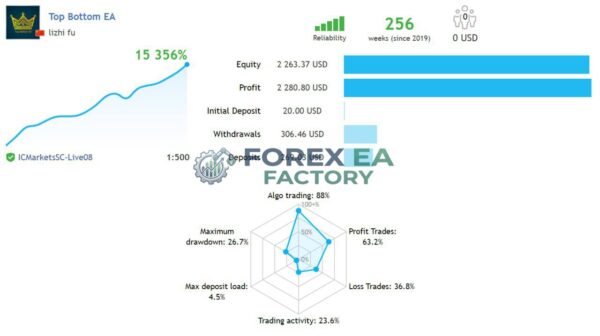
1. TopBottomEA MT4 Live signal Review
• Growth: +15,356%
• Profit: $ 2,280.80
• Initial Deposit: $ 269.03
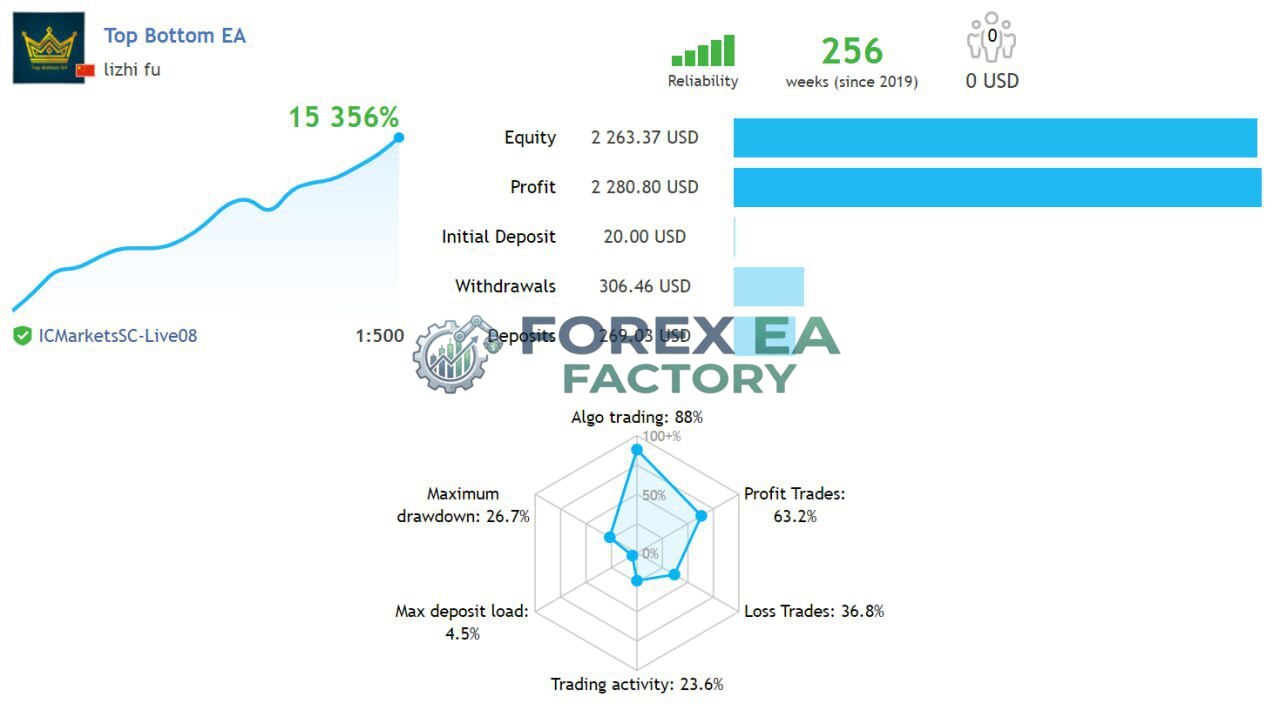
2. TopBottomEA MT4 Live signal Review
• Growth: +11,389%
• Profit: $ 1,699.87
• Initial Deposit: $ 269.03
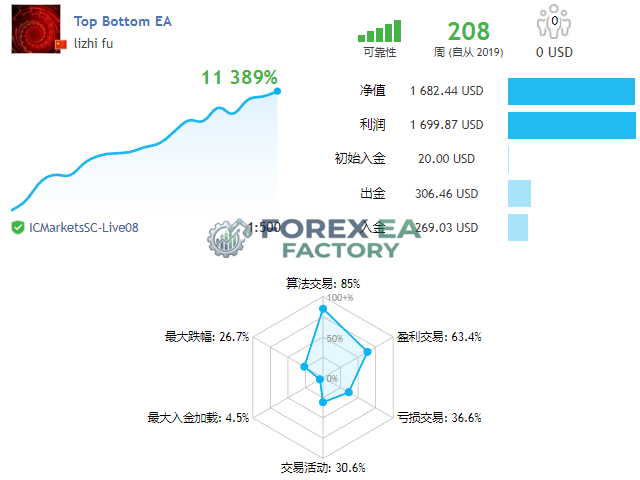
A separate Myfxbook discussion thread showed a live account with a return of -13.88% and a 15.83% drawdown. One forum user even reported losing $259 on the EA and being unable to get a refund. Additionally, an independent review noted that the vendor’s claim of a 10-year Dukascopy backtest starting from $20 is difficult to verify, and that the EA’s real-world performance has shown consecutive stop-losses in recent months. This wide gap between vendor claims and independent assessment is the single most important consideration for any potential buyer.
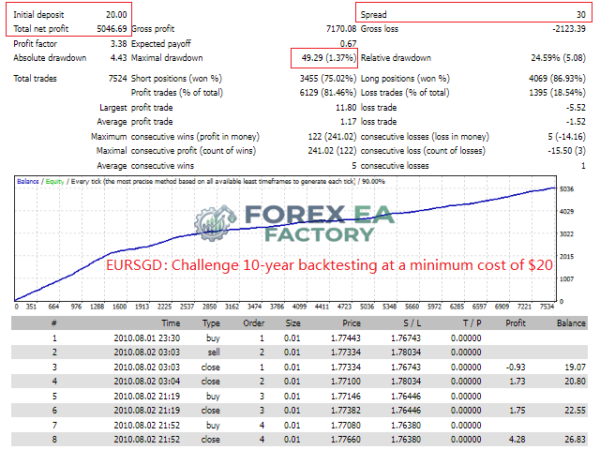
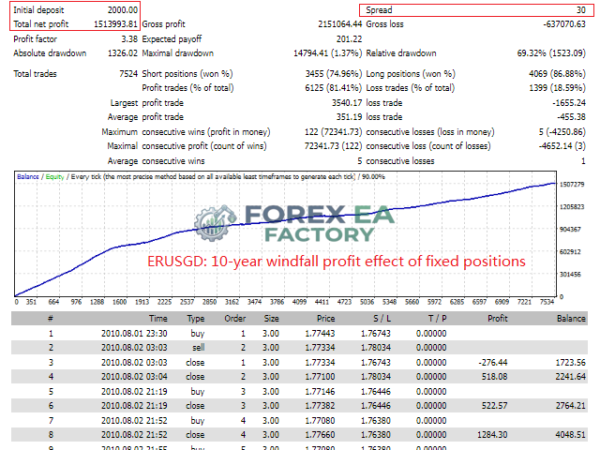
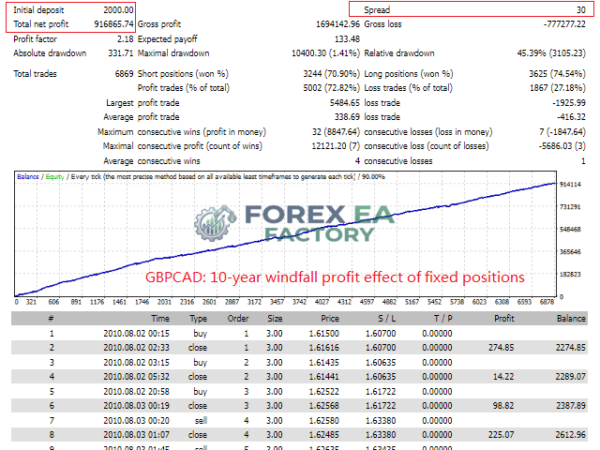
3. TopBottomEA MT4 Backtest Results


Core Features of TopBottomEA MT4
The following features are based on the vendor’s official MQL5 product listing and user documentation.
• Single-Position Execution: The EA opens only one trade at a time and does not add to losing positions. There is no martingale, no grid recovery, and no averaging down – a deliberate structural choice that limits compounding risk.
• Defined Stop-Loss on Every Trade: Every position carries a stop-loss. The stop is dynamically calculated based on recent market volatility rather than being a fixed pip value.
• Volatility-Adaptive Mechanism: The EA adjusts its entry frequency and stop placement based on current market volatility. Higher volatility reduces trade frequency, while calmer conditions allow more signals.
• Small Capital Support: According to the vendor, the EA can operate with as little as $20 in starting capital, making it accessible to traders who want to test with a minimal deposit.
• Parameter Switching Toggle: A single switch (ParameterSwitching) lets users choose between automatic vendor-calibrated parameters (false) or manual control over the three core settings: Volatility, StopLoss, and Profit (true).
• Vendor-Recommended Position Sizing: For a $1,000 account, the vendor suggests 0.03 lots per currency for drawdown-sensitive traders, or 0.05 lots per currency for those comfortable with higher risk.
• 12-Hour Average Hold Time: According to the vendor, positions are typically held for around 12 hours, with an average of approximately 4 trades per day.
Why Should You Buy TopBottomEA MT4?
• No Recovery Stacking: The one-position-at-a-time, no-martingale design means there is no risk of an account-destroying drawdown from a grid that keeps adding to a losing trade.
• Low Capital Entry: The $20 minimum deposit claim makes it possible to evaluate the EA on a small live account before committing larger funds.
• Defined Risk Per Trade: Because every position has a stop-loss, the maximum loss on any single trade is known before entry.
• Simple Configuration: With only three adjustable parameters (when ParameterSwitching is enabled), the EA is straightforward to set up compared to multi-parameter systems.
• Established Live Track Record: The vendor states the EA has been running live for over four years, which is longer than many competing products.
Who this isn’t for: The independent AlgoCheck review awarded TopBottomEA an F grade (11/100), and a Myfxbook discussion thread showed a live account with a -13.88% return. One user reported losing $259 and being unable to obtain a refund. The vendor’s claim of a 10-year Dukascopy backtest starting from $20 is difficult to independently verify. Any trader who requires robust third-party validation before purchasing should treat these signals with serious caution.
How TopBottomEA Differs From Typical EAs
The EA market is dominated by products that use grid or martingale recovery to smooth equity curves at the cost of hidden tail risk. TopBottomEA takes the opposite approach according to the vendor’s documentation. It opens exactly one position at a time, never adds to a losing trade, and puts a stop-loss on every entry. The volatility-adaptive mechanism means the EA’s behaviour changes with market conditions rather than applying a fixed logic regardless of the environment.
The vendor’s stated goal is stability over maximum return – a framing that stands in contrast to the high-return, high-recovery-risk products common in this category. However, the independent AlgoCheck review raises significant doubts about whether the vendor’s claims align with real-world results, and that discrepancy is itself a key differentiator that buyers must weigh.
TopBottomEA MT4 Strategy & Logic
Based on the vendor’s documentation and MQL5 product listing, the EA operates through this general sequence:
• Volatility Assessment: The EA continuously monitors current market volatility. This reading determines both the frequency of potential entries and the size of the stop-loss on each trade.
• Signal Generation: When market conditions meet the EA’s criteria, it generates a buy or sell signal. The volatility parameter directly controls how many signals are produced – higher volatility means fewer trades.
• Single Entry: Only one position is opened at a time. If a trade is already active, no new positions are taken until it closes.
• Stop-Loss Placement: A stop-loss is placed on the position, calculated from recent volatility data rather than a fixed number of pips.
• Exit: The position is closed when the take-profit target is reached, the stop-loss is hit, or the EA’s internal volatility-based soft-close mechanism triggers. The vendor states this mechanism can close a trade regardless of whether it is in profit or loss when conditions warrant.
Risk controls include the mandatory stop-loss on every trade, the single-position limit, the absence of martingale or grid recovery, and the volatility parameter that reduces exposure during turbulent markets. Trading carries risk. Past or vendor-reported performance does not guarantee future results. The independent AlgoCheck review and forum reports of losses highlight the importance of demo testing and careful due diligence before committing real capital.
Optimized Settings Table
| Setting | Recommended Value |
| Platform | MetaTrader 4 (MT4) |
| Timeframe | M15 (based on vendor backtest data) |
| Currency Pairs | AUDCAD, EURSGD, GBPCAD (vendor backtest pairs) |
| Min Deposit | $20 (vendor-stated minimum) |
| Recommended Deposit | $1,000 (vendor position sizing reference) |
| Leverage | 1:500 (based on vendor signal data) |
| Account Type | ECN / RAW spread account (low-spread) |
| Product Type | Expert Advisor |
| Recommended Broker | IC Markets (primary), FP Markets, Exness |
How to Install TopBottomEA MT4
1. Open MetaTrader 4 and log in to your trading account.
2. In the Navigator panel, right-click on “Expert Advisors” and select “Open Data Folder” (or navigate to the MQL4 > Experts folder manually).
3. Copy the TopBottomEA MT4 file (.ex4) into the Experts folder.
4. Restart MetaTrader 4 or right-click in the Navigator and select “Refresh” so the EA appears in the list.
5. Open a chart for one of the vendor-recommended pairs (AUDCAD, EURSGD, or GBPCAD) on the M15 timeframe.
6. Drag TopBottomEA from the Navigator onto the chart. In the settings window, enable “Allow Live Trading,” set your lot size according to the vendor’s recommendation for your account balance, and leave ParameterSwitching set to false to use the vendor’s calibrated parameters. Click OK to activate.
📩 Free Support & Setup Help – Contact us 👉 Telegram Support
Author Info
TopBottomEA MT4 is developed by lizhi fu. According to the vendor’s product listing, the EA has been in live trading for more than four years and was built around a volatility-adaptive mechanism with a focus on small-capital accessibility. The developer states that the EA was backtested using Dukascopy real historical data over a 10+ year period starting from a $20 minimum deposit. Limited independent information is available about the developer’s broader background or track record outside of this product. Independent review sources, including AlgoCheck, have raised significant concerns about the EA’s real-world performance relative to vendor claims.
Is TopBottomEA MT4 Worth It?
TopBottomEA MT4 has a genuinely appealing architecture on paper: one position at a time, a stop-loss on every trade, no martingale, and a small-capital entry point. The vendor’s stated four-year live track record and 10-year backtest are impressive claims. However, the independent AlgoCheck review awarded it an F grade (11/100), a Myfxbook discussion thread showed a live account with a -13.88% return, and at least one user reported losing $259 without a refund.
The vendor’s backtest methodology has also been questioned by independent reviewers. If you are considering this EA, treat the vendor’s performance claims as unverified, test extensively on a demo account first, and be aware that the independent evidence available does not currently support the product’s marketing narrative. Trading carries risk, and the gap between vendor claims and independent assessment here is significant enough to warrant extreme caution.
Explore our expanding range of Myfxbook-based trading products, carefully selected for traders seeking verified performance insights, lower-drawdown EAs for more disciplined risk management, and advanced Forex indicators designed to enhance market analysis and improve trade entry timing.
👉 Reviewed By – Daniel C

AlphaCompass Scalper MT4 – Build 1478+ | Unlimited
AlphaCompass Scalper MT4 is a scalping Expert Advisor designed for gold (XAUUSD) trading on the MetaTrader 4 platform. According to the vendor, it uses a compass-style directional filter to identify short-term momentum and executes trades with tight risk controls. The EA is built for traders who want an automated gold scalping system on the MT4 platform, though detailed independent performance data is limited at this time.
Aura Absolute MT4 v1.1 EA | No DLL | Build 1476 + Unlimited
Aura Absolute MT4 is a machine learning and smart grid expert advisor for MetaTrader 4, designed for nine major and cross currency pairs including EURUSD, GBPUSD and USDCAD. According to third-party analysis, it uses clustering to identify market patterns and dynamic grid spacing to adapt to volatility. The vendor claims a 1,607% gain on Weltrade-Live, though this figure is vendor-reported and not independently audited.
Benefit EA MT4 V5.1 + SetFiles | No DLL – Build 1476+
Benefit EA MT4 is a MetaTrader 4 Expert Advisor that uses a non-indicative, flexible grid strategy with statistical entry points. According to the vendor, it does not use stop-losses and closes all trades via take-profit or trailing stop. The EA is designed for hedging accounts and supports GBPUSD, USDJPY, EURUSD, and other major pairs on M1 to H1 timeframes. This review covers its strategy logic, Myfxbook-reported drawdown figures, risk reduction system, recommended settings, and installation steps so you can assess whether it fits your trading approach.
TopBottomEA MT4 Free Download
Included 100% FREE for Forex EA Factory VIP Members





Reviews
There are no reviews yet.